AI Communications








Also known as “remote work,” it’s a flexible way of working, which many prefer. In fact, Gallup recently found that 60% of Americans would like to work remotely as much as possible.
Thanks to modern technology, we no longer have to be physically present in an office space. It’s no longer always necessary. So, let’s take a look at telecommuting, its advantages and disadvantages, and go through a few tips on how to be productive while working remotely.
What is telecommuting?
Telecommuting is essentially an arrangement between employee and employer that gives the employee the opportunity to work from home—or anywhere—full or part-time. Many people prefer telecommuting, or teleworking, as a break from the traditional work environment.
It’s not quite the same as being self-employed and working from a beach at a remote location on your laptop. As a telecommuter, you still need to stay connected to the office, and you still have company targets to meet. This often means remote workers stick to the company’s surrounding local area, like a coffee shop, or rent a desk within a shared co-working space.
Understandably, some employers are hesitant about giving staff flexible work options while others are more open—it depends if yours understands that life has moved on from the typical full-time 9-to-5.
Ten years ago, telecommuting may have been harder to fathom. But technology has come a long way in a short space of time. You can start a video conference with a click of a button, and we can talk to people across the globe as long as we’ve got data or Wi-Fi.
And to go a step further, some video conferencing platforms are no longer just video conferencing tools anymore. They’re becoming more and more versatile, and all-in-one platforms like RingCentral have embraced this new way of working by providing everything you need to telecommute seamlessly and efficiently. Messaging, conference call services, phone, everything you’d need to stay in touch with teammates and prospects—you can get it all in one app:

From detailed analytics and VoIP for call centers, to customer service chats and calls for retail, no matter what industry you’re in, there’s probably a way that RingCentral can help you make your working life a little easier.
How telecommuting works
Okay, so an increasing number of industries and departments, from sales and customer service to marketing and real estate, have abandoned their old-fashioned working ways in favor of telecommuting.
But how do exactly do employees use “telecommunication” to stay connected with the team. Well, the four most common ways are through the phone, online chat, emails, and video meeting platforms.
It will come as no surprise that if you’re working remotely, you need to have excellent communication. When you’re not in the office, your contact with colleagues is instantly limited to a certain degree. (Well, unless you adopt a communication platform like RingCentral, that is.)
The benefit of choosing an all-in-one platform is twofold: one, you don’t have to pay for disparate tools every month (which can add up quickly); and two, you and your team won’t have to spend as much time managing all these different tools, both on a day-to-day basis and from an upkeep and maintenance perspective.
Ideally, you’d have fewer, more versatile tools. For example, one platform that gives you video conferencing, a cloud phone system, team messaging, screen sharing, and so on, all in one place, so you never feel like you’re missing out on team projects. You can also be more responsive to clients who expect you to respond quickly, and team leaders can even conduct remote performance reviews more easily with HD video call.
Benefits of telecommunication
Telecommunication offers numerous advantages for both employees and employers. Let’s explore the key benefits that make remote work an attractive option for modern businesses.
Good work-life balance
One of the main benefits of telecommuting is a better work-life balance. Instead of spending hours commuting each day, employees can spend that time with their families, sleep more, or enjoy meals at home. They also save money on transport and food—consider the cost of a home brew compared to a Starbucks. These savings of both time and money benefit employees directly, and a happier employee in turn benefits their company.
Dedicated workers
With less stress due to a better work-life balance and plenty of time and money saved, telecommuting workers tend to be more satisfied and dedicated to their company. With remote work now becoming the norm rather than the exception, standards have shifted: telecommuting is less an option, more an expectation. To stay competitive and attract the best talent, offering telecommuting as an option is essential.
Increased productivity
Remote workers often have a quieter environment at home compared to busy open-plan offices where interruptions from colleagues are common. Employees can tailor their workspace to suit their exact needs, from lighting and temperature to noise levels, allowing them to get into the flow of their work more easily. Telecommuting also means people can work during the hours they feel most productive—early morning or late at night—rather than being forced into a 9-to-5 schedule. The sense of autonomy and trust from employers can motivate workers to perform better and take ownership of their work.
Lower operational costs
Telecommuting significantly reduces operational costs for businesses. A reduced need for office space means companies can save on rent, utilities like electricity and air-conditioning, and maintenance costs. Companies can also cut spending on office supplies, furniture, and equipment since remote workers often use their own resources. Additionally, offering telecommuting benefits leads to higher employee satisfaction and retention rates, reducing the recruitment and training costs associated with higher turnover.
Access to larger talent pool
By allowing telecommuting, companies gain access to a broader talent pool beyond their city and surrounding area. This geographical flexibility opens doors to finding the most appropriate candidates regardless of location, and enables building more diverse teams that include single parents, people from different cultural backgrounds, and people with disabilities. Without geographical restrictions, companies can hire people with highly specialized or niche skills from anywhere in the world, offering a competitive advantage in attracting top talent who prefer remote work options.
Physical and mental health benefits
Telecommuting offers several health benefits for both companies and employees. Eliminating the daily commute reduces stress and improves mental health and overall well-being. With more time available, employees can participate in physical activities, prepare healthy meals, and establish regular routines involving therapy or self-care practices like meditation. Working from home also reduces exposure to common illnesses like colds and flu, leading to fewer sick days. The flexibility and autonomy of telecommuting empowers workers and lowers anxiety levels, while customizable ergonomic workspaces reduce the risk of musculoskeletal problems.
Environmental benefits
Telecommuting has a positive impact on the environment by reducing carbon emissions—fewer cars on the road means less air pollution and lower greenhouse gas emissions. It also reduces energy use in commercial office buildings, as fewer people in the office means less need for heating, cooling, and lighting. Additionally, telecommuting reduces the consumption of office supplies, paper, and other resources, meaning less waste. The development and use of digital tools further reduces the need for physical resources, promoting a more sustainable way of working.
Disadvantages of telecommunication
While telecommuting offers many advantages, it’s important to be aware of potential challenges. Here are some common drawbacks to consider:
- It can be challenging if you don’t have the right software
- It can create the feeling of isolation at times
- More meetings are needed to stay connected
- Workdays can stretch out longer because employees can simply continue working at home
Side note: One of the most frustrating aspects of working from home can be poor software. By using proficient software like RingCentral, collaboration is much easier. Connecting with your team members is a breeze with features like business phone service, virtual call center, contact center and CCaaS.
Tips if you’re working a telecommuting job
Here’s a look at RingCentral and some other essentials you’ll need if you want to get telecommuting right:
Make sure you have all of your technology for working remotely
Technology opens the window for us to work remotely, but not if we leave everything at the office. Let’s start with the basics. You’ll need your computer, charger, mouse, and keyboard, a solid internet connection (make sure it has the bandwidth to handle your normal office workload), monitor(s), printer, and a headset with a microphone.
Dedicate a location just for work
It’s important to find a comfortable spot at home that you can dedicate to working. Maybe it’s your kitchen table or a separate desk in the living room. When you have a dedicated workspace, every time you get in your seat, you’ll be in the mindset of work concentration.
Get dressed like you’re going into the office
The freedom to work in pajamas sounds marvelous, but sadly, our minds don’t work that way. Instead, our minds associate the comfort of our sleepwear with work, which results in a wardrobe-inspired drop in professionalism and productivity.
Dressing for success puts us in the professional mindset we need to get things done. It also shows our families, housemates, and ourselves that we’re in the zone and keeping distractions to a minimum.
Set reasonable work hours
Working from home means you have more flexibility with your schedule. Need to take the kids to school every morning? Set your schedule from 8:00 a.m. to 5:00 p.m. Working around your life priorities allows you to concentrate and zoom through your workday unhindered.
Keep your to-do list updated
It’s easy to lose sight of your priorities when your boss and peers aren’t breathing down your neck. A to-do list helps you visualize your tasks and plan far ahead so you know how to pack your schedule.
Have a good laptop, desktop, or mobile phone
Your company should provide you with reliable equipment, or at least ensure that you have sufficient equipment to start telecommuting. If you’re working from a home office, then a desktop is more than enough.
Use the right software
Your company may have software they prefer you to use to keep the team aligned and all working from the same place. Download this reliable software on your laptop and mobile device.
RingCentral
RingCentral and remote work pretty much go hand-in-hand. Its HD video conferencing capabilities, coupled with a cloud phone system, make it a no-brainer for businesses who want employees to work remotely, but still stay connected. Here’s a quick look at how the phone app works:

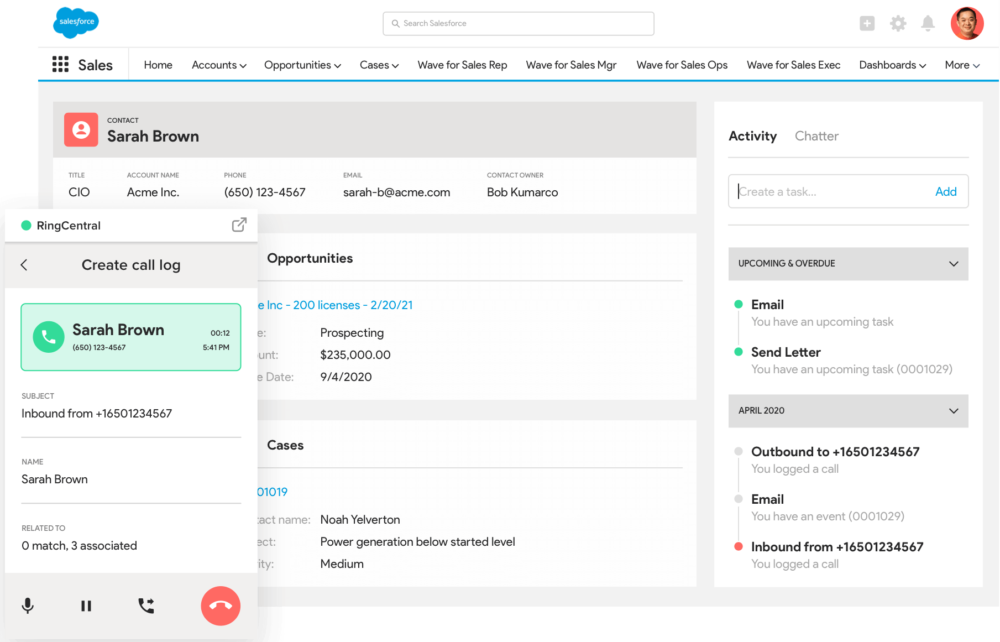
If you’re new to remote work but you’re already using applications like Trello or Salesforce, then they can be easily integrated with RingCentral. Save time from flicking through apps and keep everything in one easily accessible place and call your prospects and customers straight from your desktop:
This software is great for project management, too. You can message your team, share files, and assign tasks to teammates:

(It also makes it easy to maintain accountability, prevent absenteeism and remove the temptation for a team member to slack off.)
And if you work in a client-focused business, this type of app is great because it helps you be accessible to clients—without the need to give away your personal phone number. With RingCentral’s app, for instance, the built-in number shielding feature allows you to mask your number with your office phone number while taking calls on your personal cell phone.
See how MHP&S’ attorneys use the RingCentral app to give their clients an awesome experience while maintaining privacy.
Other features include:
- File sharing—great for sharing telecommuting policies and other work-critical documents
- Event management right in the app
- Team messaging
- Audio and video calling—including a meeting flip feature that allows you to “flip” a call from your computer to phone (or vice versa)
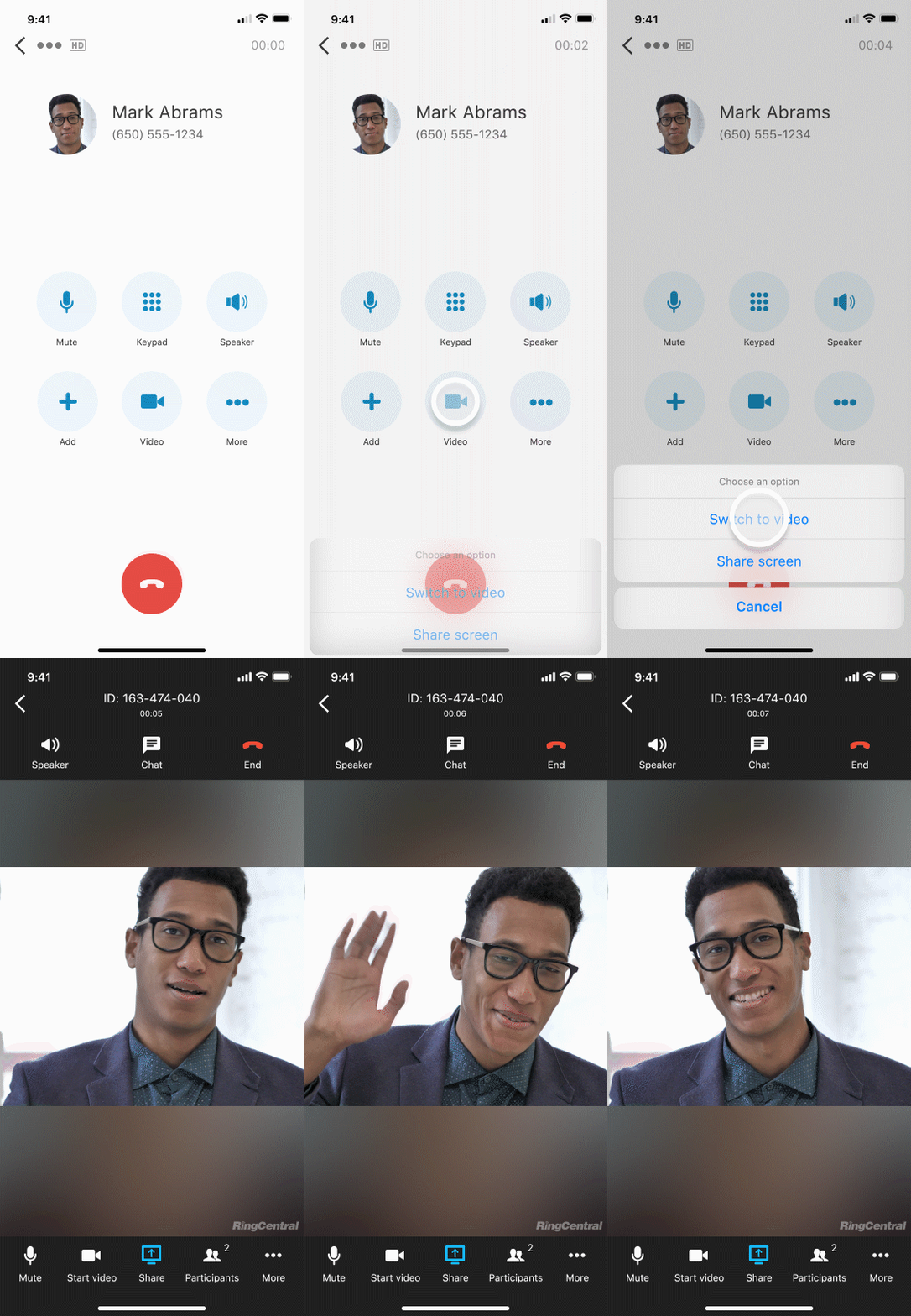
- Robust mobile app for both iOS and Android
- Countless integrations
🕹️ Get a hands-on look at how RingCentral is designed to make telecommuting not only possible, but also super productive. Book a product tour:
💰 You can also use this calculator to see roughly how much your business could save by using RingCentral to support your team’s communication with each other—and clients.
Google Drive
Google Drive can be beneficial if you’re constantly sharing files and spreadsheets. Many people across various industries use Google Drive, from graphic designers to accountants.
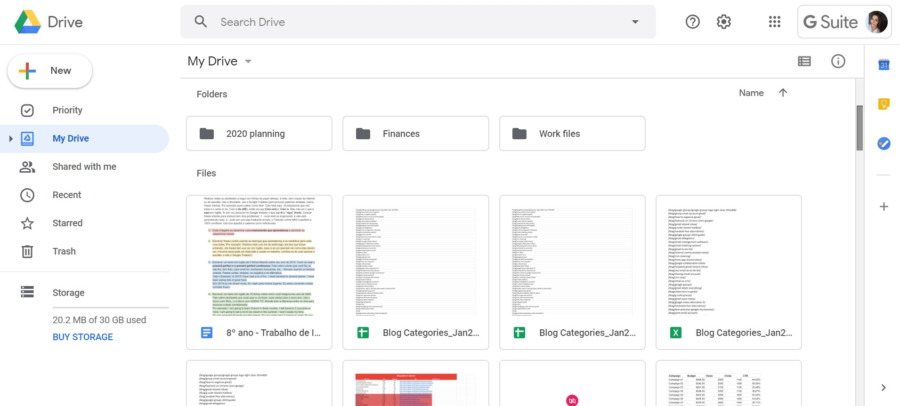
You can:
- Send files to anyone who has a Google Drive account, which can be handy if you’re sending information to a client or another business.
- Share files with team members
- Store up to 15 GB for free
Oh, and RingCentral has a Google Drive integration, so you can upload files to a conversation from Google Drive directly (or from your own computer:

Skitch by Evernote
Note-taking can be necessary if you’re always on video calls and you don’t want to forget any important information mentioned. Skitch is the latest development from note-taking app Evernote. It allows you to:
- Send pictures to colleagues
- Annotate images to better explain what you mean
- Add hand-written or typed-up notes
It’s a great solution for telecommuters if you don’t want to screen share with a team member, but you want to send them a screenshot of your notes.
Is telecommuting for you?
Some people dislike the idea of teleworking away from the office. They believe that they can’t be as productive at home with this style of work arrangement. Sometimes they just miss human contact. And that’s fine!
At the end of the day, full-time telework isn’t for everyone. But, if you do like the idea of a more flexible workday, then ensure you’ve got everything you need to work effectively and efficiently from home—or anywhere you like.
Updated Nov 17, 2025