AI Communications









IP telephony is far from an emerging technology. The first IP phone was introduced in the 1990s. Today, IP-based telephony is accessible to businesses of all sizes, with unified communications solutions also integrating text messaging, chat, video conferencing, fax, and other channels.
For businesses like yours, that means unifying your communications and making everyone’s lives easier. That’s not all, though; IP telephony offers many advantages while also reducing your operating costs.
This guide covers the IP telephony definition, its benefits and challenges, and how you can transform your business communications.
IP telephony: Key takeaways
- IP telephony refers to technology that transmits voice, video, and messaging over the internet
- Cloud-based solutions leveraging IP telephony eliminate expensive infrastructure while potentially providing advanced features like AI transcription, call analytics, and omnichannel capabilities
- Setup is simple with most providers—port existing numbers, configure users, and start calling within hours without requiring technical expertise
- Key benefits include cost savings, remote work support, easy scalability, and automated compliance with industry standards
- Traditional phone lines are being phased out globally, and cloud-based IP telephony solutions future-proof your business.
What is IP telephony?
IP telephony refers to using Internet Protocol (IP) to transmit communications over the internet. It enables users to send voice, video, and messages over a network connection. An IP phone system converts voice into digital packets for transmission over networks, then decodes them back into audible speech for recipients.
IP telephony vs VoIP: What’s the difference?
IP telephony is an umbrella term for any technology that uses the internet to transmit communication data. VoIP stands for Voice over Internet Protocol and refers to the technology specifically designed for transmitting voice data over the same networks used for webpages and emails.
Today, the terms VoIP and IP telephony are often used interchangeably, and most VoIP solutions include communication channels besides voice-only.
| VoIP | IP Telephony | |
| Scope | Largely for voice calls but can send videos and other media | Voice, video, messaging, fax, voicemail, etc. |
| Components | Voice transmission method | Includes VoIP plus additional services |
| Examples | Voice calling or video meeting features in apps | Cloud-based business phone systems, unified communications |
Hosted IP telephony vs cloud-based IP telephony: What’s the difference?
Hosted IP telephony and cloud-based telephony are two different approaches to the same challenge; how to make phone calls using the internet.
Hosted IP telephony solutions use dedicated servers and equipment located at your service provider’s data center to manage your phone system. The provider owns, maintains, and operates the infrastructure on your behalf, but it’s dedicated specifically to your organization.
You’ll typically need IP desk phones and internet connectivity to connect to the hosted IP telephony service. The provider handles all the technical management, updates, and maintenance of your dedicated phone system remotely.
With cloud IP telephony you connect to a virtual phone system hosted in the cloud. The provider owns and maintains the infrastructure, hosting IP telephony for small businesses and large enterprises alike.
Requiring less upfront investment, you only need an internet-connected smart device or computer to use the software and make VoIP calls. Cloud-based phone services give you access to advanced capabilities and integrations.
How IP telephony works
So far, we’ve covered the meaning of IP telephony. Now, let’s get into what’s behind the scenes making IP telephony work:
Key components of IP telephony systems
IP telephony systems can be configured for various purposes and environments. At the same time, almost every system is made up of a combination of the same core components:
- IP PBX – A central hub to provide internet access and manage incoming and outgoing phone calls. This includes features such as voicemail, call routing, forwarding, and extensions.
- IP phones – These are specialized desk phones capable of connecting to your network.
- Softphones – An alternative to using IP desk phones; softphones are apps or software to connect computers and smartphones to the network for making and receiving calls.
- Gateways – Connect your IP telephony system to the public switched telephone network (PSTN) for external calls.
- Session Border Controllers (SBCs) – Manage and secure network traffic as it moves from a private network (your system) to a public network (the internet).
- Network infrastructure – Includes routers, switches, Ethernet ports, and cables for creating physical connections to the internet.
IP telephony protocols
We keep talking about these “protocols”, so it makes sense to delve a little deeper into how exactly they help you to make voice calls over the internet. IP telephony protocols are a set of standards and rules that enable devices to connect and communicate over a network.
Common protocols include:
- Session Initiation Protocol (SIP) – Signaling protocol for initiating, managing, and terminating a multimedia session.
- H.323 – An older protocol that works similarly to SIP.
- Real-time Transport Protocol (RTP) – Used to send real-time streaming data, including audio and video.
- RTP Control Protocol (RTPCP) – Just as it sounds, a protocol for monitoring and managing RTP sessions.
- Media Gateway Control Protocol (MGCP) – Controls and modifies media gateways that allow network connectivity.
IP telephony deployment models
IP telephony deployment models fall into two main categories; site-based or cloud-based.
Site-based deployment types
- Single-site – Houses all IP telephony equipment and network infrastructure at one physical location, such as your main office or that of a hosted provider. This model works well for small to medium businesses with centralized operations. It gives you more control over your phone system.
- Multi-site centralized – Uses one primary location to host the IP telephony infrastructure while serving multiple branch offices or remote locations. Your headquarters (or provider) manages the central IP PBX system. Your smaller sites connect to the system through secure network connections.
- Multi-site distributed – You have multiple sites, and each location maintains its own IP telephony infrastructure and equipment. Your IP PBX systems are independent but can communicate with each other. This model offers redundancy and local control but requires more technical resources and management at each location.
Cloud-based deployment types
- Private – Uses cloud infrastructure dedicated solely to your organization. There’s no throttling from shared resources. You have your own servers, isolated from other users. A private cloud offers enhanced security, customization, and control, ideal for organizations with strict compliance requirements or unique configuration needs.
- Public – Connect to a shared cloud infrastructure. This is how most VoIP services operate, giving you ultimate convenience and flexibility to access your phone system from anywhere with an internet connection. You access IP telephony features through web portals, browser plugins, and mobile apps without worrying about hardware maintenance or updates.
- Hybrid – Combines elements of both private and public cloud deployments. This allows you to keep sensitive information on your private cloud on-premises (or hosted) while using the public cloud for basic activities like making VoIP phone calls. Hybrid deployments can also work with legacy systems.
IP telephony benefits
The IP telephony market is projected to grow from over $33 billion in 2024 to over $72 billion by 2032:
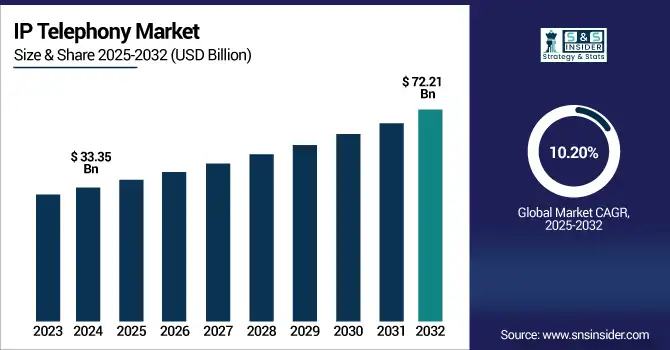
Such vociferous growth is a sign of the times. Modern businesses are adopting VoIP and other IP telephony technology for the many benefits that internet-based communications offer over traditional landlines:
Saves money
IP telephony takes on the bulk of the infrastructure costs. If you opt for a hosted or cloud solution, you only need internet access, IP phones, and/or softphones.
Additionally, many VoIP providers offer lower rates for long-distance and international phone calls. You’ll also require less IT expertise to run your system, reducing your staff overhead.
Less maintenance
IP telephony services, like a cloud-based VoIP phone service, are ideal for SMBs. Besides saving money, another of the benefits of IP telephony is that it eliminates the headaches of managing IT and network infrastructure. The providers take care of infrastructure upgrades and updates.-
Support remote teams
IP telephony systems make it easy for remote and hybrid teams to access your communications network from home. They simply connect to your on-site network or a provider over the internet. From there, they get readily available access to your system and business tools.
Gain advanced capabilities
Traditional PBX systems do give you some call management features, such as call routing and voicemail. IP-based solutions, however, often offer far greater capabilities. Some of these include omnichannel communications, call recordings and transcriptions, sales dialers, and intelligent interactive voice response (IVR).
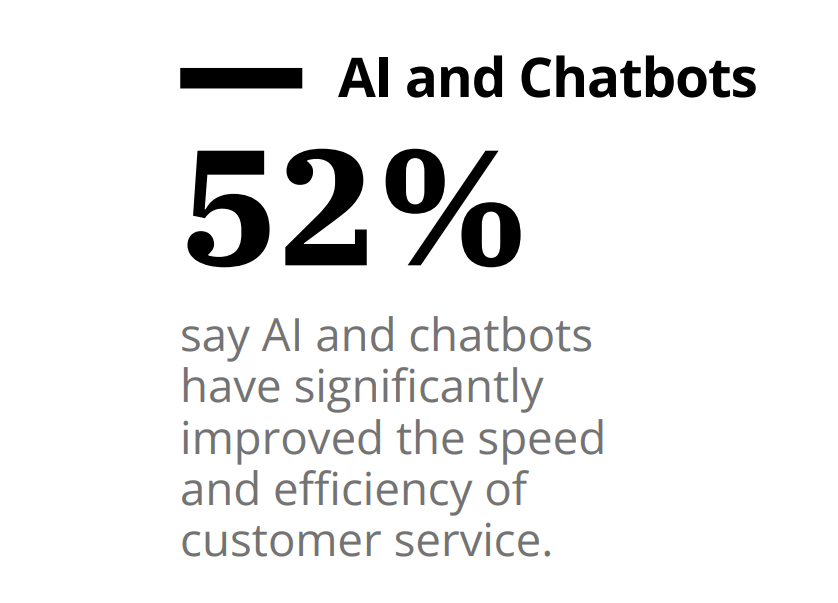
Modern platforms like RingCentral RingEX are powered by AI, which is leading to new and emerging capabilities. For example, by giving you access to intelligent chatbots, which 52% of customers say improve the speed and efficiency of customer service.
Streamline workflows
IP telephony solutions can more readily connect to the business applications you use, like your CRM, helpdesk software, and productivity tools.
This means your team can make calls and send messages without having to switch between apps. Features like click-to-call and automatic call logging give your team more time to focus on what they do best. App integrations also centralize data for better call quality analytics and deeper insights.
Better scalability and flexibility
Scaling a traditional PBX requires the installation of copper phone lines, phone jacks, and other equipment. With IP telephony solutions, you can add users, extensions, and numbers with a few clicks.
Admin portals make it easy for managers to control user permissions and privileges. With platforms like RingCentral’s, you can deploy unified communications and virtual contact centers in minutes to hours.
Easy security and compliance
Keeping up with national and state compliance requirements can be difficult. Adhering to multiple regulations from countries around the world can seem nearly impossible.
Platforms like RingCentral RingEX maintain certifications for standards like SOC 2, HIPAA, and GDPR, taking the burden off your IT team. In addition, call recordings are stored securely in the cloud, and every conversation is protected by end-to-end encryption (E2EE).
Future proofing
The last, but certainly not least, of the advantages of IP telephony, is that it can futureproof your business communications. In many countries around the world, PSTN phone lines are being phased out and will ultimately be switched off. Investing in IP telephony sets your business up for whatever may come down the road.
Challenges when adopting IP telephony
IP telephony lifts your business phone system out of the 20th century, ready for now and the emerging technologies of the future. However, that doesn’t mean there aren’t any adoption challenges.
Inconsistent call quality
An IP phone system can deliver higher-quality audio than traditional phone lines. At the same time, calls via a VoIP phone can experience latency and suffer from network jitter that causes echoes, data loss, and dropped calls. To get optimal call quality, you need a stable internet connection with enough bandwidth to meet demand.
Power disruption
If the power goes out, so do your routers, server, and IP telephony equipment. Power disruption is one of the rare cases where traditional phones have the advantage, because analog handsets and landlines don’t need electricity to operate. Avoid power issues by having generators or backup power solutions available when needed.
Resistance to change
New technology initiatives are often met with some skepticism and resistance. Team adoption is crucial because a cloud or hosted IP phone system provides no value if your staff refuses to use it.
Get buy-in from leadership and educate from the top down. Provide ample training resources and emphasize the benefits, such as convenience, flexibility, and streamlined workflows.
Cybersecurity
IP telephony does make security manageable when you choose a trustworthy provider. However, if you choose an on-premises solution, you’ll require IT and security experts to monitor for vulnerabilities. They also need to regularly update hardware, firmware, software, and security protocols to mitigate evolving cyberattacks.
Features of the best IP telephony system
When it comes to choosing an IP telephony solution, there is an overpopulated city of options. Don’t get overwhelmed and lost in the crowd. Narrow down your search by prioritizing the best features for using VoIP in business:
- Advanced call handling – Essential features like call forwarding, transfer, hold, call queuing, and voicemail that keep your business communications running smoothly.
- Custom call routing – Automatically direct incoming calls to the right person or department based on caller ID, time of day, or skills-based criteria.
- Auto-attendant/IVR – Greet callers with professional menu options that let them self-direct to the appropriate department without tying up your staff.
- Unified communications – Combine voice, video, messaging, and collaboration tools in one platform so your team can communicate seamlessly across all channels.
- Call recording – Capture and store conversations for training, compliance, quality assurance, and dispute resolution purposes.
- Number portability – Keep your existing business phone numbers when switching providers to maintain continuity with customers and vendors.
- Online faxing – Send and receive faxes digitally through email or web portals without maintaining separate fax machines or phone lines.
- Desktop, browser, and mobile apps – Access your phone system from any device, anywhere, giving your team flexibility to work remotely or on the go.
- Integrations – Providers like RingCentral offer hundreds of pre-built integrations for your other business tools to streamline workflows and improve productivity.
Those are must-have features to look out for. The very best IP telephony solutions, meanwhile, can also provide an even broader selection of advanced capabilities, such as:
- AI assistant, receptionists, and more – Intelligent automation that handles routine inquiries, schedules appointments, and provides 24/7 customer support without human agents.
- AI transcriptions, notes, and call summaries – Automatically convert conversations to text and generate summaries, eliminating manual note-taking and improving record-keeping.
- Visual voicemail – Voicemail transcriptions that let you read and manage messages without having to dial in and listen sequentially.
- Translations and AI smart composer – Real-time language translation and AI-assisted message composition that helps your team communicate more effectively.
What else to look for from IP telephony providers
Features are the core functions you need from a provider, while advanced capabilities may determine which option best aligns with your business goals.
Here are some other things to consider when choosing a cloud or hosted IP telephony service:
- SLAs with high availability – Guarantee minimum uptime percentages (99.999% with RingCentral) to ensure your phone system stays operational when you need it most.
- Security and compliance – Built-in encryption, access controls, and regulatory compliance features that protect sensitive customer data and meet industry requirements.
- Flexible pricing plans – Platforms like RingCentral RingEX offer multiple pricing packages starting as low as $20 per user, per month.
- Scalability options – Capabilities, modules, and integrations available to help scale operations as your business grows.
- International calling rates and coverage – Competitive rates for long-distance and international calls with reliable service quality to key markets where your business operates or plans to expand.
- Customer support – Responsive 24/7 support available through multiple channels with knowledgeable staff who can resolve issues quickly and minimize downtime.
- Onboarding and training materials – Setup and deployment assistance, knowledge bases, training portals, and documentation that help your team get up and running smoothly.
How to set up IP telephony systems
You don’t need to wait for telecoms experts, network engineers, or anyone else to install equipment. With cloud-based systems, you can have your team making VoIP calls in hours or less.
Setting up an IP telephony system can be as simple as following these steps:
- Assess your current situation – Evaluate your current infrastructure. Assess whether you have legacy tools you want to maintain and identify your compliance and security requirements. Estimate current and future user numbers. List out other details such as office locations, countries of remote team members, and desired phone features.
- Select a deployment model – Choose a deployment model that fits your budget, needs, and technical requirements. For most businesses, a cloud-based provider like RingCentral is the best choice because it offers rapid deployment, ease of use, and high availability.
- Choose a provider – Use the information at hand to focus on the best internet phone service for your business. This will likely require a balance between budget, features, flexibility, and scalability.
- Prepare your network – You’ll need enough bandwidth to handle VoIP communications. This is typically around 2-4 Mbps upload/download per concurrent user. You may need to add more Ethernet ports and routers to ensure sufficient office-wide connectivity.
- Port existing numbers – Work with your provider to port over your existing business phone numbers. This maintains your number equity, local presence, and ensures existing customers can reach you.
- Configure equipment – Set up any IP desk phones and VoIP phones. Connect them to the internet and the system. For softphones, download the device apps and connect them to the Wi-Fi network.
- Add users, set up features – Log into the provider’s admin portal to add users and extensions. From here, you can also customize features like call routing, business hours, and voicemail.
- Train your team – Take every stakeholder and end-user through the basics of using the system to make calls, send messages, and personalize their interface and settings.
- Test your system – Before going live, test all features thoroughly on multiple devices. Make test calls between team members, verify voicemail works correctly, and ensure mobile apps function properly.
IP telephony can help futureproof your business communications
IP telephony isn’t only the future of business communications, it’s the present. If you’re still struggling with your traditional PBX and landlines, you’re already behind in the race.
RingCentral RingEX enables you to call, message, chat, fax, and video conference from any device with network connectivity. Call routing and call management features ensure customers reach the right person as quickly as possible.
Our platform also comes with advanced capabilities powered by AI, such as call transcriptions, summaries, and automated workflows that mean your team spends less time on manual, repetitive tasks.
Get in touch with our sales team to get started on your IP telephony journey today.
IP telephony FAQs
What’s the difference between VoIP and IP telephony?
VoIP specifically refers to voice calls over the internet, while IP telephony is a broader term that includes voice, video, messaging, fax, and other communications transmitted over IP networks.
What is an IP telephony device?
An IP telephony device is any hardware or software that connects to your network to make calls, including IP desk phones, softphone apps on computers and smartphones, and VoIP adapters that convert traditional phones.
What are the advantages of IP telephony for small businesses?
IP telephony for small business delivers benefits like lower costs, easy scalability, remote work support, and easier access to advanced features like auto-attendants and call recording.
Originally published Aug 14, 2025