AI Communications









How hosted contact centers work, how they differ from on-premises and cloud CCaaS models, and what enterprise teams should weigh before they buy.
The hosted contact center conversation often starts with a familiar problem: the contact center you inherited may be built for a different decade. It runs on servers in a room down the hall, it takes a change request and a maintenance window to add capacity, and every new channel your customers adopt arrives as another bolt-on your team wires in by hand. Customer volume keeps climbing while customer tolerance for friction keeps shrinking.
That gap is why so many customer experience (CX) leaders are rethinking where their contact center actually lives. Pick the wrong infrastructure and you lock yourself into rigid capacity, multi-month upgrade cycles, and channels that stay siloed while customer expectations keep rising.
A hosted contact center is one possible answer, and it helps to understand the model clearly before evaluating vendors. This guide covers what it is, how it compares to on-premises and cloud models, and what to weigh before you commit.
Key takeaways
- A hosted contact center runs customer interaction software on a provider’s infrastructure and delivers it over the internet, so you can avoid on-site hardware.
- Hosted, cloud, and contact center as a service (CCaaS) models overlap heavily but differ in architecture and in how much the provider manages for you.
- The economics can favor hosting: predictable subscription costs replace large capital outlays and the burden of maintaining your own equipment.
- The real differentiator in 2026 is embedded AI, so evaluate agent guidance and analytics alongside uptime and routing.
- Match the model to your priorities: control and customization pull toward on-premises, while speed, scale, and lower overhead pull toward hosted or cloud.
What is a hosted contact center?
A hosted contact center is customer service software, including routing, interactive voice response (IVR), reporting, and digital channels, that a third-party provider runs on its own infrastructure and delivers to your agents over the internet on a subscription. Your team logs in remotely, while the provider manages the underlying infrastructure.
Compare that to the model it replaces. Instead of buying, housing, and maintaining physical servers on site, you rent the capacity and let the provider handle infrastructure, updates (including after-hours patches), and uptime.
This setup fits distributed teams, remote and hybrid agents, and organizations that need to add or remove seats without launching a hardware project.
How a hosted contact center works
The interaction path is simple at a high level. A customer reaches out by voice or a digital channel, the platform routes them based on rules and availability, and your agents handle every interaction from a browser-based workspace. Agents can work without a dedicated desk phone or local software install, depending on the platform and configuration.
Behind that, the provider manages the infrastructure. Data centers, security, redundancy, and maintenance all sit with the vendor, so upgrades can roll out without on-site installation. Because the workspace lives in a browser, agents sign in from anywhere with a connection, which is what makes hosted models a genuine fit for hybrid and remote operations rather than a compromise.
Hosted vs. on-premises vs. cloud contact centers
This is the comparison many enterprise buyers need before choosing a model. The three terms get used interchangeably in sales decks, but the differences change your cost, your control, and how fast you can adapt. The table below lays out where each model runs and who it suits.
| Model | Where it runs | Cost structure | Maintenance and upgrades | Best fit |
|---|---|---|---|---|
| On-premises | Your own servers, in your facility | Large upfront capital plus ongoing IT costs | Your team owns patches, upgrades, and uptime | Regulated or highly customized operations that need full control |
| Hosted | Provider’s servers, accessed over the internet | Predictable subscription, minimal capital | Provider manages infrastructure and updates | Distributed teams that want lower overhead without running hardware |
| Cloud (CCaaS) | Provider’s multi-tenant cloud infrastructure | Subscription, scales with usage and seats | Continuous provider updates | Teams that want elasticity, fast rollouts, and embedded AI |
A note on the labels: hosted and cloud often get marketed as the same thing, and for many buyers they’re close enough to treat that way. The nuance still matters when you evaluate architecture, which the next two sections unpack.
Hosted vs. on-premises contact centers
The clearest split is ownership and location. On-premises contact center means you own and run the hardware inside your own facility. Hosted contact center means the provider runs it and you reach it remotely.
That difference shows up in the money and the effort. On-premises contact center requires large upfront capital and an in-house IT team to keep it running. Hosted contact center operates on a predictable subscription and hands the maintenance to the provider. Over time, that can be the difference between a capital-intensive project and a predictable operating expense.
On-premises contact center isn’t obsolete, though. It offers maximum control and deep customization, and some regulated or highly bespoke operations still need exactly that. If your compliance posture requires direct control over every layer, owning the stack can still be a defensible choice.
Hosted vs. cloud contact center and CCaaS
Many providers use “hosted” and “cloud” interchangeably, and CCaaS is the subscription delivery model most cloud platforms sell. If a vendor uses all three terms, the important question is what architecture and management model sit underneath the label.
There’s still a useful distinction underneath. Some “hosted” setups are single-tenant environments a provider manages on your behalf, dedicated to you. Cloud and CCaaS platforms are typically multi-tenant, elastic, and continuously updated, so you share pooled infrastructure and get new capabilities without waiting for a release you have to install.
For most buyers, the label matters less than three things:
- How elastic it is when volume spikes
- How well it integrates with the tools you already run
- How capable its AI is
Those answers matter more than the category label.
Benefits of a hosted contact center
Beyond the architecture, the appeal comes down to business outcomes.
- Lower, more predictable costs: Shifts spending from capital expense to a forecastable operating expense
- Faster scaling: Capacity expands in days rather than quarters
- Less operational burden: No internal team required to maintain hardware
- Elastic capacity: Absorbs seasonal or unexpected demand spikes without over-provisioning
- Strong remote and hybrid support: Built for distributed agents, not just in-office teams
- Built-in redundancy: Provider redundancy can help maintain uptime if a single site goes down, since vendors often invest in resilience at a scale many individual companies can’t match.
- Backed by market momentum: Both Grand View Research and Fortune Business Insights project the CCaaS market roughly quadrupling by the early 2030s, with double-digit annual growth in both forecasts, signaling a mainstream shift toward hosted and cloud delivery.
Key features to look for in a hosted contact center
Uptime and routing used to be selling points. Now they’re table stakes, which means you should evaluate vendors on the capabilities that move CX and cost metrics. Start with the fundamentals every serious platform should cover, then weigh how each vendor puts AI to work on top of them.
Omnichannel routing
Omnichannel routing brings voice and digital channels, including chat, email, text messaging, and social, into a single queue so every conversation lands in one place regardless of where it started. Agents lose context every time a customer switches channels and has to repeat themselves.
For a mid-market or enterprise team fielding volume across multiple channels, a unified queue keeps the conversation history intact and cuts the handle time that fragmented channels add.
Skills-based and intelligent routing
Skills-based and intelligent routing matches each customer to the agent best equipped to help them, based on factors like language, product expertise, or account tier, rather than whoever picks up next.
Misrouted contacts are one of the biggest hidden drivers of average handle time (AHT) and repeat contacts. Getting the right agent on the first pass protects both the customer experience and the cost per contact that leadership tracks.
Interactive voice response (IVR) and self-service
IVR and self-service tools deflect routine, repetitive questions, like order status or password resets, before they ever reach a live agent. For leaders under pressure to control headcount costs, every routine contact resolved through self-service is one agents don’t have to handle.
Workforce management
Workforce management covers forecasting, scheduling, and adherence: predicting contact volume and staffing the right number of agents with the right skills at the right times.
Understaffing drives long wait times and abandoned contacts. Overstaffing quietly inflates labor costs. Getting this right is one of the most direct levers a contact center has on both experience and budget.
Real-time dashboards and reporting
Real-time dashboards and reporting give supervisors visibility into what’s happening on the floor as it happens, not after a shift ends. That visibility lets supervisors intervene mid-shift, whether that’s shifting an agent to cover a queue spike or coaching someone through a difficult call, instead of diagnosing problems the next day when the damage is already done.
Application integrations
Customer relationship management (CRM) and application integrations pull customer history and account context directly into the agent’s workspace instead of forcing them to toggle between systems.
Context-switching costs agents time on every interaction, and customers can tell when an agent doesn’t have their history in front of them. Integration is what turns a contact center platform into part of the broader customer data ecosystem instead of a system that sits apart from it.
Security and compliance certifications
Security and compliance certifications help confirm whether a platform meets the regulatory standards that apply to your industry, whether that’s the Health Insurance Portability and Accountability Act (HIPAA), Payment Card Industry Data Security Standard (PCI DSS), or SOC 2.
For regulated industries like healthcare, finance, or insurance, a platform that can’t meet compliance requirements should be removed from consideration, regardless of how strong its other features are.
Embedded AI
Embedded AI is one of the clearest 2026 dividing lines. The platforms worth shortlisting put AI to work in two distinct places:
One is real-time guidance for agents during live interactions. The other is post-interaction analytics that reviews every conversation after it ends, covering all of them rather than a sample. A standalone chatbot is not the same as AI embedded across routing, agent guidance, and analytics.
AI is already handling meaningful interaction volume. It fully automates about 20% of all customer interactions, and Metrigy predicts AI will fully resolve 37% of all customer inquiries by 2028. A capability that can resolve a meaningful share of customer interactions should be part of the core evaluation.
This is where a platform like RingCX shows what AI-first looks like in practice. It brings voice and more than 20 digital channels into a single AI Omnichannel Contact Center workspace, so agents guide, resolve, and review without leaving the workflow they already live in.
How to choose a hosted contact center
Strong evaluations start with your operating reality, not the vendor’s feature grid. Begin with three inputs: the channels your customers use, the way your agents work (in-office, hybrid, fully remote), and your integration and compliance requirements. From there, run the practical checklist.
Total cost of ownership
Total cost of ownership looks past the headline per-seat price to what you’ll actually pay once implementation, add-ons, overages, and support tiers are factored in. Per-seat pricing can look similar across vendors until those additional costs are included. Buyers who compare sticker price alone may end up paying more than they budgeted for.
Uptime service level agreements (SLAs) you can verify
An SLA is only as strong as the redundancy behind it, including geographic failover, data center architecture, and documented incident history. For a contact center, downtime is customer-facing the moment it happens. The gap between a vendor’s uptime claim and a commitment you can independently verify is the gap between a marketing claim and your actual risk exposure.
Security and regulatory certifications for your industry
The certifications that matter depend on the industry, not a general security badge. Financial services and insurance typically look for SOC 2 Type II and PCI DSS. Healthcare organizations often require HIPAA compliance. Multinational organizations add the General Data Protection Regulation (GDPR) and ISO 27001 to the list.
A platform can hold broad security certifications and still fall short of the specific standard a given industry regulator requires.
A rigorous evaluation treats certification claims as facts to verify, not marketing language to accept at face value. That means confirming a certification covers the specific product and hosting environment in scope, reviewing the audit report itself rather than a badge on a website, and checking the renewal date, since a certification earned years ago may no longer be current.
Integration depth with your CRM and existing stack
A checkbox integration list isn’t the same as integration depth. What matters is whether data syncs both ways and shows up in the agent’s workspace in real time, not just whether a connector exists. A shallow integration puts agents right back to toggling between systems, which erases the benefit the integration was supposed to deliver.
A credible AI roadmap, in writing
A verbal promise about upcoming AI features during a sales cycle isn’t a commitment. A written roadmap with named capabilities and timelines gives you a clearer basis for post-contract accountability. Given how fast AI capabilities are shifting in this category, a documented roadmap is also leverage at renewal.
Quality of support and implementation
Implementation is where many projects succeed or stall. Evaluate the implementation process and support model with the same scrutiny you give the feature list, because a platform with the right capabilities on paper can still fail in deployment if support resources are limited or the implementation team is overstretched.
AI readiness across the architecture
Add one more lens on top of the checklist: whether intelligence is embedded across routing, live agent guidance, and analytics, or stitched on after the fact as a separate product. Where AI lives in the architecture tells you how well it actually works, and how far it can extend as your needs grow.
One structural detail is easy to miss during vendor evaluation. A hosted platform built on a unified communications foundation lets your contact center and the rest of the business run on one system, so context carries across teams instead of fragmenting the moment a customer gets transferred out of the queue.
RingCentral: An AI-first hosted contact center
For teams that want these contact center features but not the hardware, RingCX is an AI-first, cloud-delivered contact center. It gives distributed teams omnichannel routing and embedded intelligence over the internet, so there is no on-site hardware to rack, patch, or upgrade.
What sets it apart is how it splits real-time help from after-the-fact review:
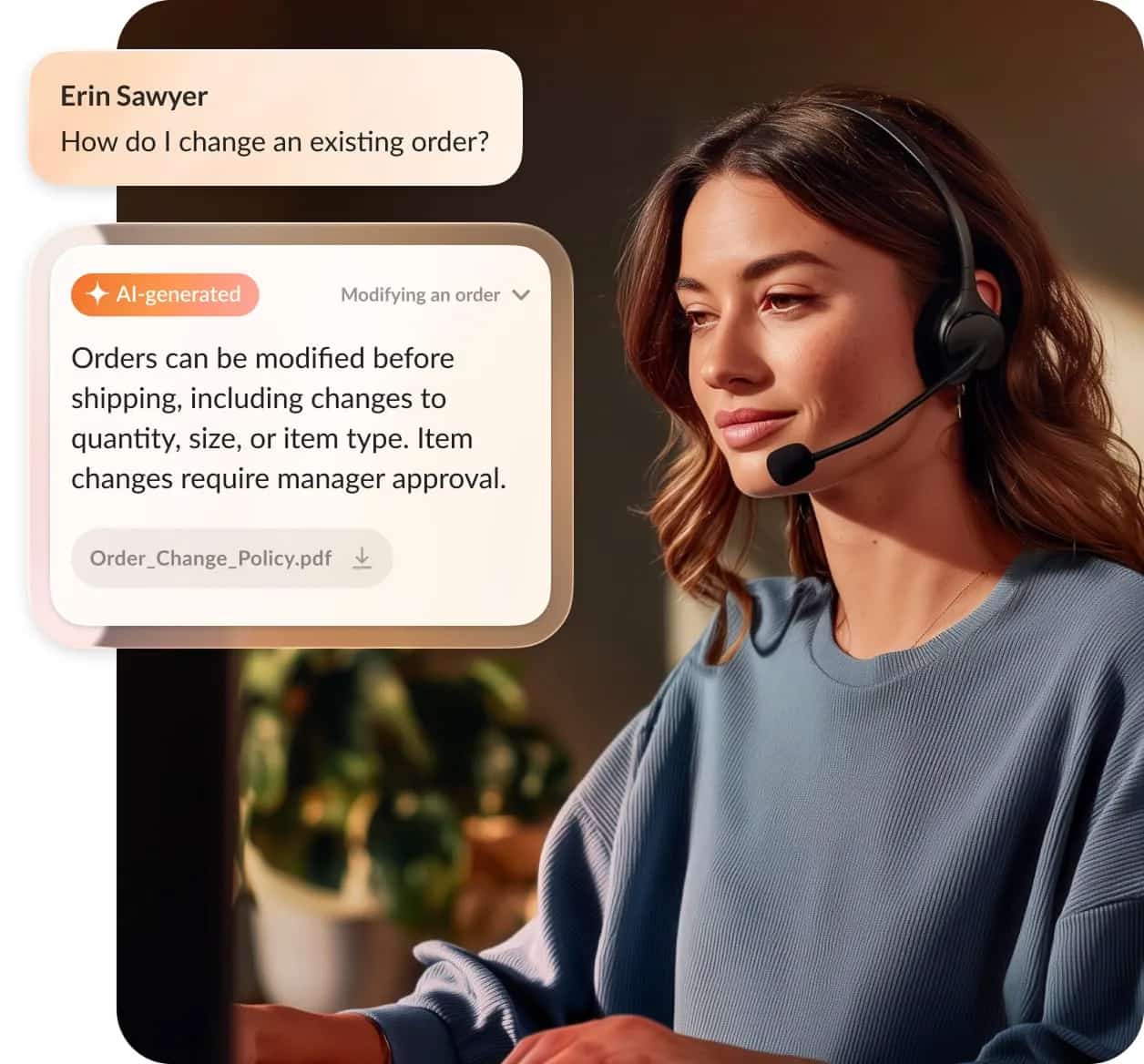
- AVA Agent Assist gives live agents real-time, in-workflow guidance while a call is happening, surfacing answers and next steps in the moment.
- AVA Supervisor Assist gives supervisors real-time visibility into live interactions, so they can coach or step in while a call is in progress instead of catching issues after it ends.
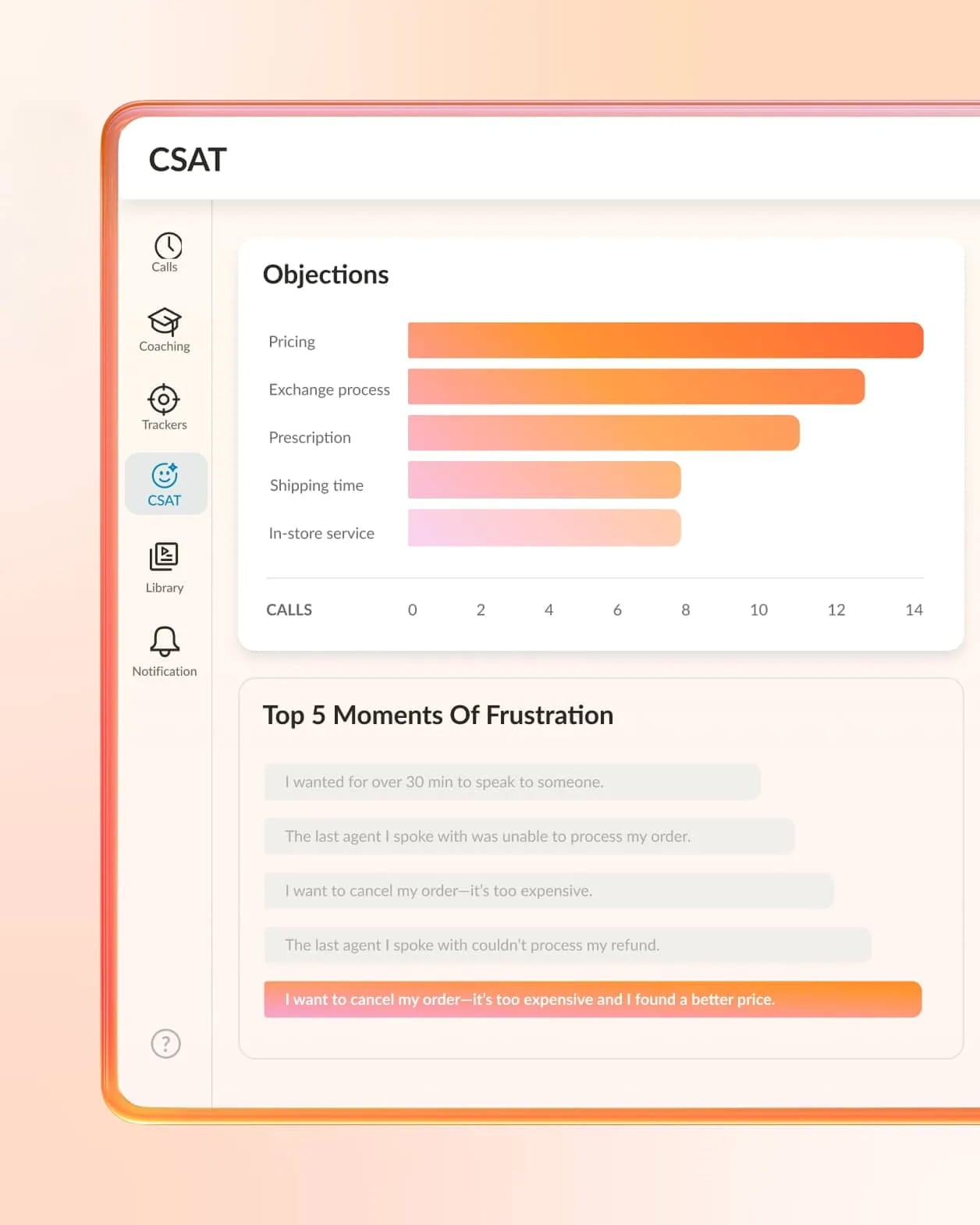
- AI Interaction Analytics supports post-interaction review by analyzing sentiment, intent, and root cause across 100% of completed conversations. This keeps live agent guidance and full-coverage analysis as separate jobs.
The platform foundation matters too. RingCX runs on the same infrastructure as RingEX, so contact center agents and the wider workforce operate on one connected system. When a customer needs an expert who sits outside the queue, the context travels with them instead of getting lost at the handoff.
Move to a hosted contact center with confidence
The hosting decision is really a question about pace and intelligence: how quickly can you adapt when demand shifts, and how much help can you put in front of agents while customers are still on the line? Choose for flexibility, integration depth, and embedded AI, and the infrastructure choice becomes clearer.
Start with a concrete next step. Map your current channels, costs, and integration needs against the criteria above, then use that map to shortlist vendors instead of reacting to the most polished demo. When you’re ready to see what fits, compare contact center plans and pricing to weigh options for a hosted, AI-first contact center that scales with your team.
FAQs about hosted contact centers
What is the difference between a hosted and cloud contact center?
They overlap so much that many providers use the terms interchangeably. The practical distinction is architecture: a hosted contact center can be a single-tenant environment a provider runs on your behalf, while cloud (and CCaaS) platforms are usually multi-tenant, elastic, and updated continuously. Both deliver software over the internet and reduce on-site hardware management.
How much does a hosted contact center cost?
Most hosted contact centers use a subscription priced per agent, per month, which replaces the large upfront capital expense of on-premises hardware.
Your total cost depends on seat count, the channels and features you enable, and add-ons like AI or workforce management. Because pricing scales with usage, you pay for the capacity you actually run rather than buying for peak and idling the rest of the year.
Is a hosted contact center secure?
A reputable provider typically invests in security, redundancy, and third-party compliance certifications at a scale that would be difficult for a single company to match. Verify the specifics and ask:
- Which certifications the vendor holds (for example, SOC 2, HIPAA, or PCI DSS)
- How data is encrypted in transit and at rest
- Which uptime guarantees they provide
Security is a shared responsibility, so confirm the provider’s controls match your industry’s requirements.
What is the difference between a hosted contact center and an on-premises contact center?
An on-premises contact center runs on hardware you own and maintain inside your own facility, which means large upfront capital and an in-house IT team.
A hosted contact center runs on a provider’s infrastructure and reaches your agents over the internet on a subscription.
On-premises contact centers give you maximum control at the cost of flexibility and higher maintenance responsibility, while hosted contact centers offer lower overhead, faster scaling, and provider-managed maintenance.
Can hosted contact centers support remote and hybrid agents?
Yes, and it’s one of the model’s biggest advantages. Because the agent workspace runs in a browser, agents can sign in from anywhere with an internet connection, without on-site equipment. That makes hosted contact centers a natural fit for distributed and hybrid teams, and it lets you add or remove seats without a hardware project.
Originally published Sep 08, 2026