AI Communications








Voice has outlived every prediction of its decline. When something matters, people call. They call when money is involved. They call when timelines are tight. They call when stakes are high.
At the same time, AI has moved from experimentation to ubiquity. The RingCentral Agentic AI Trends 2026 shows that 97% of organizations are already using AI, and nearly half are deploying AI agents to coordinate workflows. The conversation is no longer about whether to adopt AI. It is about whether AI systems work together.
That shift changes how voice AI should be implemented.
A voice AI agent is not just a digital receptionist. When set up properly, it becomes the structured front door to your workflows. It captures intent, connects systems, and moves work forward without forcing customers or employees to repeat themselves.
In this blog, we’ll share how to configure a voice AI agent using RingCentral AI Receptionist so it delivers value from the first call. We’ll also highlight industry-specific use cases to ensure configuration aligns with the workflows, compliance needs, and response expectations unique to your sector.
Why setup determines whether voice becomes leveraged
A phone call represents commitment. The caller is ready to schedule, buy, clarify, escalate, or decide. That moment carries operational value.
If a voice AI agent answers politely but does not capture structured data or update systems, a human employee must reenter the information later. That introduces delay and duplication.
Instead, when a voice AI agent captures intent as structured data and pushes it directly into your CRM, scheduling system, or routing logic, the request advances immediately. Human agents step in only when judgment or complexity requires it.
The difference lies in configuration discipline.
The technology inside a voice AI agent is capable. The results depend on how clearly it is aligned with your actual workflows and how precisely escalation to a human agent is defined.
Step-by-step: Setting up a voice AI agent with RingCentral AI Receptionist
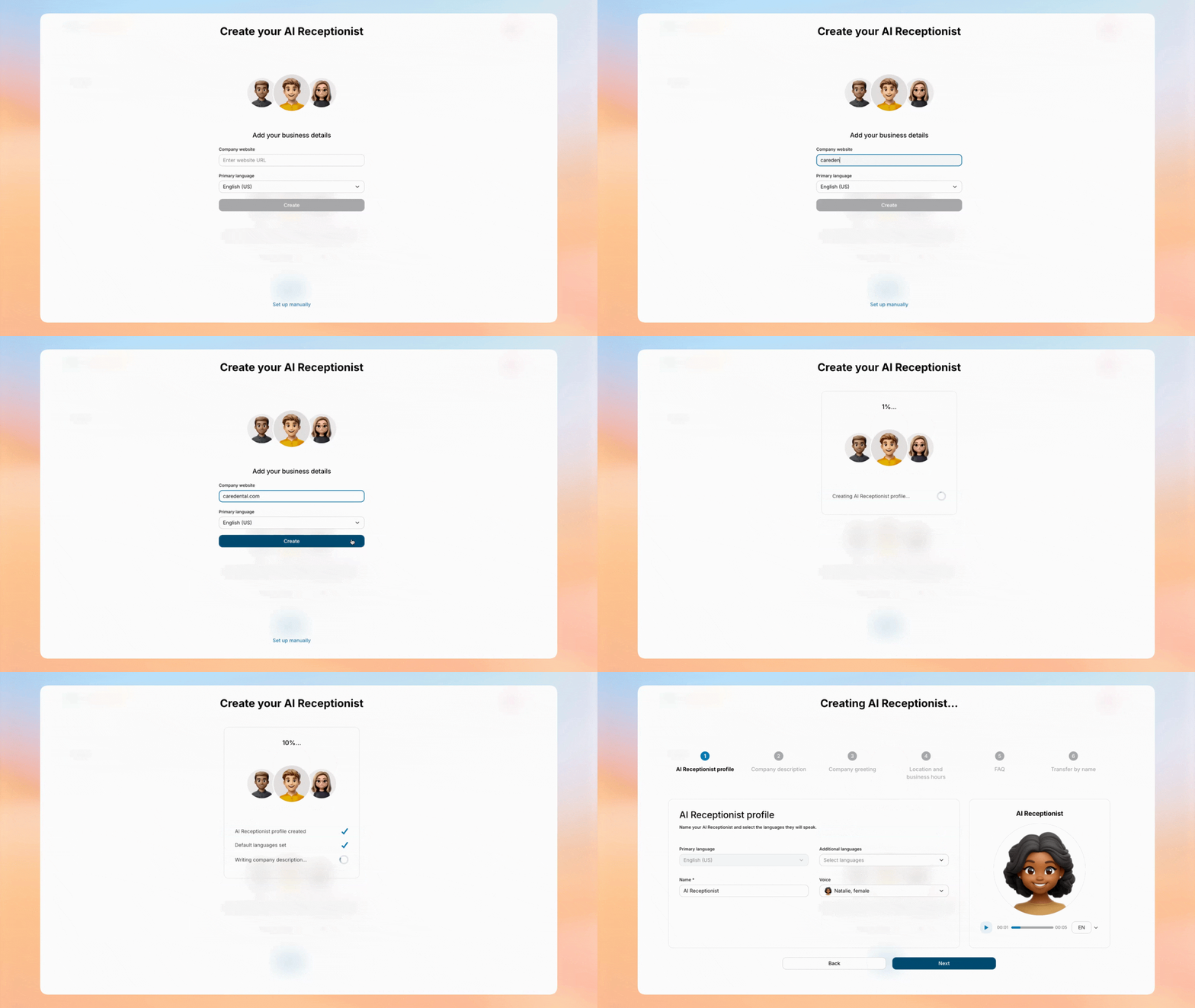
RingCentral AI Receptionist is designed to remove friction from deployment. The onboarding experience is guided, automated, and centralized. You are not building from scratch. You are refining a system that is preconfigured to reflect your business.
The entire setup flow has been redesigned to feel intuitive. Instead of navigating multiple admin pages, you move through a structured sequence that connects business information, call routing, integrations, and analytics in one place. Many teams can complete the initial setup and begin testing within the same day.
Step 1: Start with automated, guided onboarding
The first step is straightforward. Inside RingCentral AI Receptionist, you enter your business website.
From that single input, the platform automatically creates your voice AI agent with a prefilled configuration. This includes:
- Your business hours
- An initial greeting
- A summary of your services
- Responses to common customer questions
You are not writing scripts line by line. You begin with a working model that reflects your business.
The system guides you through reviewing this draft. You see how the voice AI agent will greet callers. You see how it answers common inquiries. You can refine tone, adjust service descriptions, and personalize responses before activating the system.
This is guided onboarding in a practical sense. The platform walks you through what to confirm, what to edit, and what to test. You are not guessing what to configure next. Each stage appears in order.
The goal is clear: reduce setup time while preserving control.
Step 2: Assign phone numbers and define call handling in one unified view
Once the initial configuration is reviewed, you decide which phone numbers the voice AI agent will answer.
Assigning numbers and configuring call rules used to require navigating multiple tabs in RingCentral admin portal. Now, RingCentral AI Receptionist presents numbers, locations, call rules, and usage visibility in a single consolidated interface.
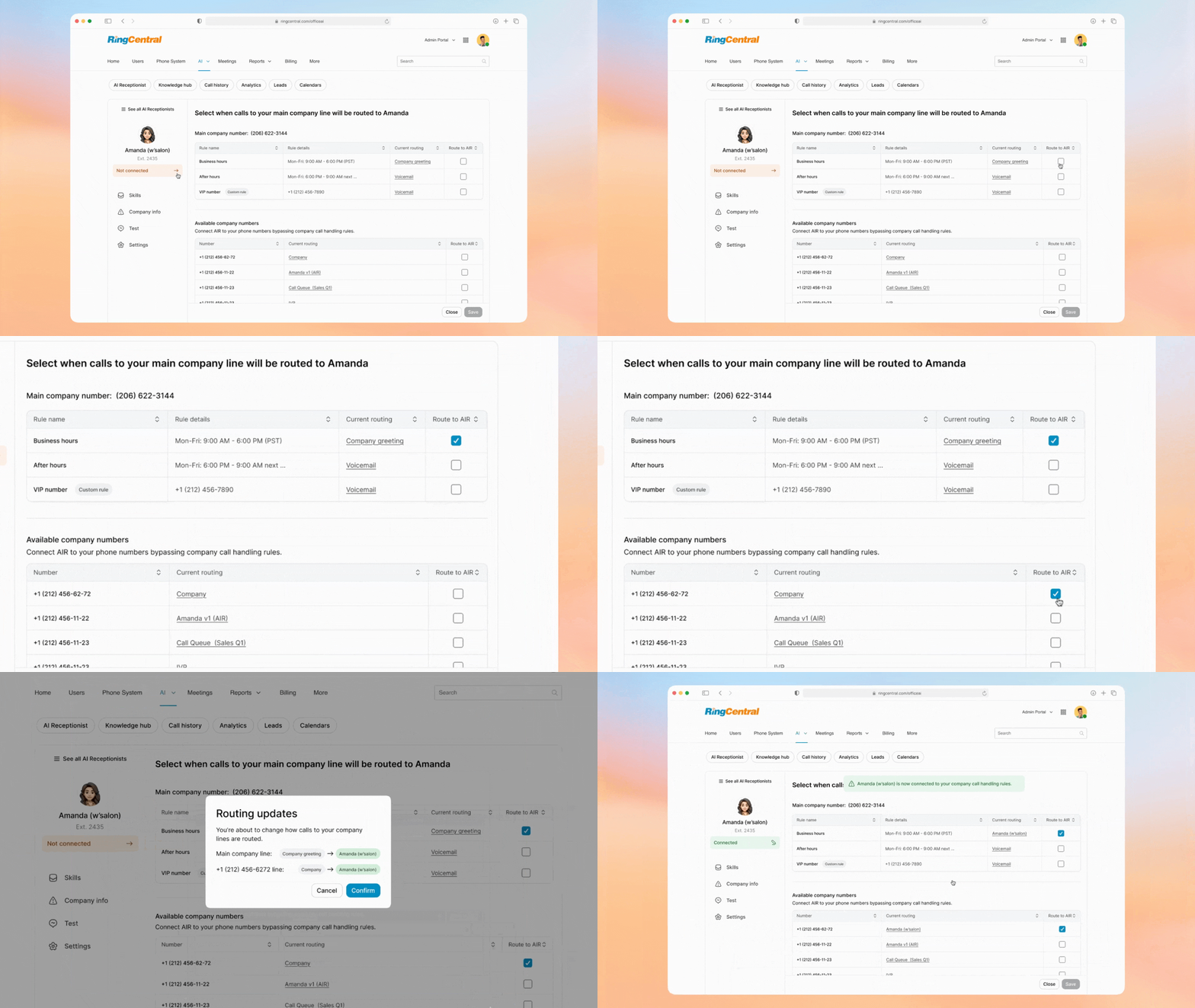
You can see:
- Which numbers are available
- Which numbers are assigned to the voice AI agent
- How calls are handled during business hours
- How calls are handled after hours
You define when the voice AI agent resolves a request independently and when it transfers the call to a human agent, such as a receptionist, sales representative, or support specialist.
Before going live, you can test different scenarios. Call during open hours. Call after closing. Simulate urgent language. Confirm that transfers include structured context so the human agent understands why the call was escalated.
This visibility reduces configuration errors and eliminates confusion about call flow.
Step 3: Connect your systems through the centralized Integrations tab
A voice AI agent becomes operationally meaningful when it interacts directly with your existing tools. RingCentral AI Receptionist includes a dedicated Integrations tab. In this single location, you can view available integrations, see what is connected, and add new integrations in just a few clicks.
Supported integrations include platforms such as HubSpot, Zoho, Salesforce, Google Calendar, and Outlook.
Once connected, the voice AI agent can:
- Book appointments in real time
- Reschedule or cancel appointments
- Create new CRM records from inbound calls
- Sync structured call details directly into your systems
For example, if a new customer calls after hours requesting pricing information, the voice AI agent can collect contact details and reason for inquiry, then automatically create a lead in HubSpot or Zoho. When a human sales agent logs in the next morning, the inquiry is already structured and ready for follow-up.
This integration step is guided and centralized. You do not navigate separate portals. You authorize connections directly within the interface.
Step 4: Configure structured lead capture and intake logic
RingCentral AI Receptionist allows you to define customizable intake questions. These questions should reflect real operational needs.
For sales-oriented teams, this may include service type, budget range, or preferred timeline. For service organizations, it may include an account number or an issue category.
Once CRM integration is active, answers provided during the call are automatically synced to your CRM after the call ends. There is no need for a human agent to listen to voicemails and manually create records.
This structured capture ensures that when a call is resolved by automation, it still generates actionable data. When a call is transferred to a human agent, that agent sees context immediately.
Step 5: Enable multilingual capability and geographic expansion
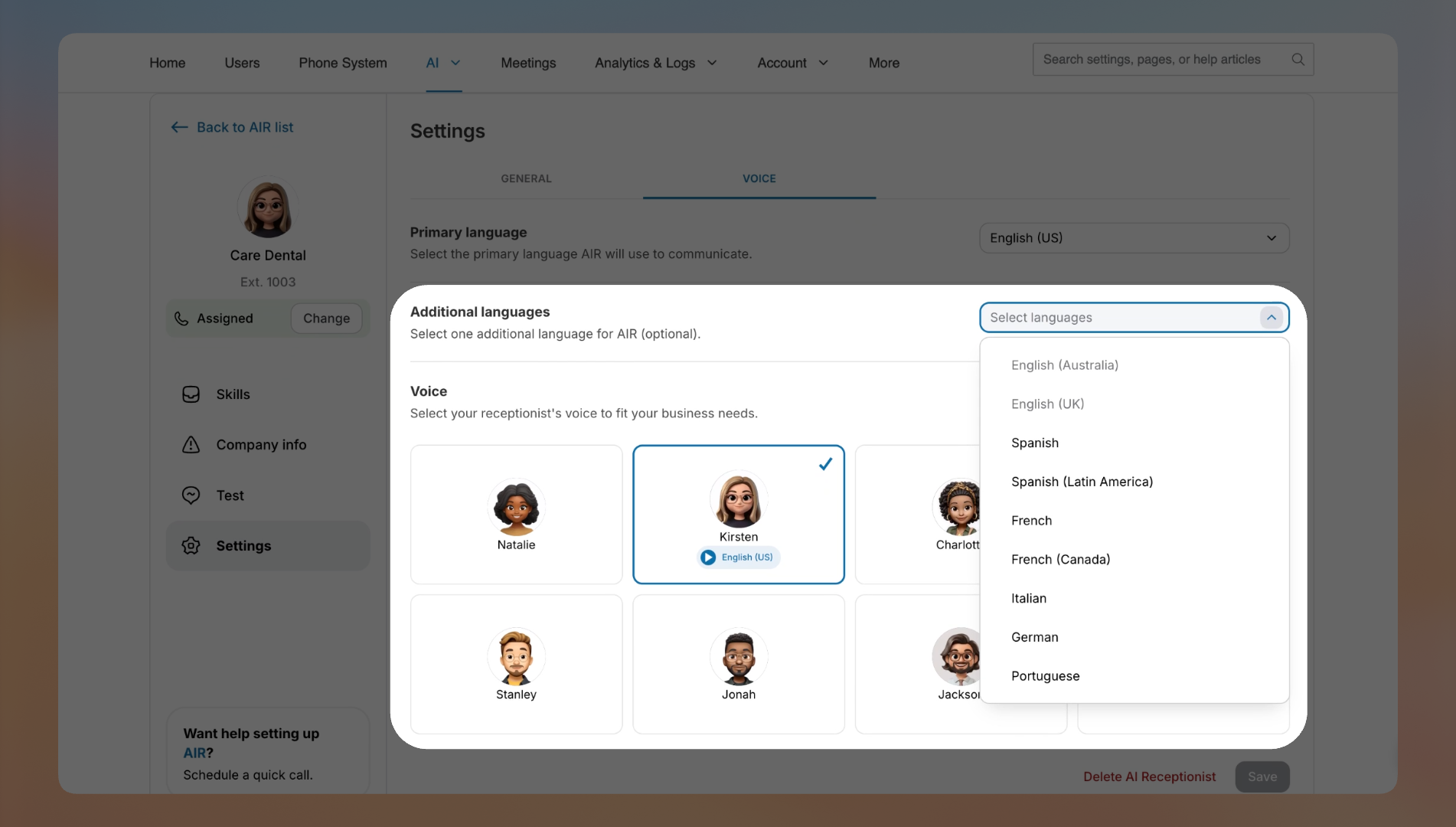
If your organization serves multilingual customers, RingCentral AI Receptionist supports expanded language capabilities. The voice AI agent can understand and respond in additional languages and can automatically detect and switch languages during a conversation.
Activation does not require separate phone lines or duplicate configurations. The language logic operates within the same structured workflow.
The platform is also available in multiple European countries, including France, Germany, Spain, and Portugal, allowing organizations operating in the EU to deploy the same core experience with regional support.
Multilingual configuration extends reach without multiplying operational complexity.
Step 6: Monitor usage and refine using centralized analytics
After activation, use the Analytics tab to monitor performance.
You can view:
- Minutes used
- Remaining minutes available
- How calls are distributed across scenarios
This visibility prevents billing surprises and provides insight into call volume patterns.
If you observe frequent transfers for a specific inquiry type, you can refine the response logic. If call volume increases during certain hours, you can adjust staffing for human agents accordingly.
Refinement is handled within the same centralized environment. Adjustments are clear and controlled.
Industry alignment: Configuring a voice AI agent for sector-specific workflows
The technical setup is the same, but there are some strategic focus areas that you may want to pay extra attention to based on your industry.
Healthcare
Healthcare organizations manage heavy administrative volume before any clinical interaction occurs. Appointment coordination, insurance verification, and intake questions compete with cases that may signal urgent medical need.
Where configuration matters most:
- Real-time integration with provider schedules
- Escalation triggers tied to symptom language or urgency cues
- Standardized responses for insurance, preparation, and office policies
- Structured capture of patient identifiers and visit purpose prior to transfer
The objective is operational relief without clinical risk. Administrative traffic is streamlined, while time-sensitive situations move directly to qualified staff.
Real estate
In real estate, inbound calls often reflect immediate buying intent. Prospects expect fast answers on availability, pricing, and showings, and response delays can shift attention to another listing.
Where configuration matters most:
- Early qualification of budget, property criteria, geography, and timeline
- Calendar synchronization for confirmed showings during the call
- Automatic creation of CRM opportunities, including after-hours inquiries
- Intelligent routing of high-intent buyers to the appropriate agent
Here, the focus is speed-to-lead and pipeline velocity. The system must convert live interest into measurable opportunity without manual reentry.
Recruiting
Recruiting workflows are frequently slowed by interview coordination and candidate follow-up. Many inbound calls relate to scheduling clarity, hiring stages, or role alignment.
Where configuration matters most:
- Structured capture of candidate availability and role preferences
- Direct integration with recruiter calendars and applicant tracking systems
- Clear, consistent communication around hiring timelines
- Context-rich escalation for executive searches or sensitive discussions
The result is reduced coordination overhead, enabling recruiters to spend more time assessing talent and less time managing logistics.
Insurance
Insurance interactions often occur during moments of stress or financial exposure. Accuracy, compliance, and proper routing are non-negotiable.
Where configuration matters most:
- Immediate classification of intent across claims, billing, and policy servicing
- Detailed incident intake before escalation to a claims professional
- System integration for status lookups and automated updates
- Defined escalation paths for regulated or complex cases
In this setting, the voice AI agent reinforces compliance standards while accelerating resolution and minimizing administrative rework.
Contact centers
Contact centers handle a mix of repetitive service requests and nuanced escalations. Efficiency depends on separating predictable volume from cases that require human judgment.
Where configuration matters most:
- Automation of common inquiries, such as order status or account updates
- Intent-based routing that prioritizes experienced agents for complex cases
- Preservation of structured context across transfers
- Ongoing analytics to refine containment and escalation thresholds
The goal in a contact center is operational balance between automation and human expertise. Routine demand is absorbed systematically, while human agents concentrate on situations where expertise and empathy drive outcomes.
From answered calls to coordinated operations
AI is no longer a differentiator. Nearly every organization has adopted it. The real advantage lies in building AI that moves the business, not just the conversation. A call carries urgency and intent, but if it ends as a transcript, humans rebuild the context and momentum is lost. When voice operates as connected intelligence, intent is captured once and activated everywhere.
That shift defines the future of voice AI agents: not automation layered onto friction, but orchestration that compounds speed. The organizations that structure voice as shareable intelligence won’t just respond faster—they’ll execute faster.
FAQ
Is setup complicated for a small team?
No. A simple, template-based setup with your hours, services, and policies can be live quickly without technical staff.
How long does it take to set up a voice AI agent for a local business?
Usually, same-day to two weeks, depending on the number of phone lines, call flow complexity, integrations, and customization.
Can I build or configure my own voice AI agent without a dev team?
Yes. Most platforms have visual builders for defining intents, connecting systems, and setting guardrails, with optional APIs for advanced teams.
Can I see examples, demos, or templates?
Yes. Vendors typically provide ready-made templates (e.g., dental, HVAC, restaurant, real estate), live demos, and case studies. Check out RingCentral AI Receptionist demo.
How do we test and refine before scaling?
Run internal test calls, import FAQs, A/B test scripts, monitor transcripts, and adjust flows weekly based on analytics.
Can I customize tone, script, and policies by industry or location?
Yes. You can apply different scripts, compliance language, and response tones per business line or region.
Does it work with existing phone systems and call center stacks?
Yes. Most platforms connect via SIP, webhooks, or virtual numbers, so you can keep your existing setup and agents.
Originally published Mar 11, 2026