AI Communications









Lawyers, paralegals, and other members of the legal profession have intense and busy jobs. Often they’re engaged in high-stakes, highly complex legal tasks. However, a lot of the time, they’re bogged down in arduous research, paperwork, and filings. AI legal tools have evolved to ease that burden.
We’re going to present nine examples of legal AI software that your law firm could use to boost productivity, enhance research, and speed up the drafting of legal documents. First, though, let’s get fully up to speed on the use of artificial intelligence in law.
Key takeaways
- The best AI legal tools are designed to augment (not replace) legal expertise, with the biggest gains in research, document review, and drafting workflows.
- Specialized legal AI platforms (like CoCounsel or Harvey) outperform general tools for research and compliance-sensitive tasks.
- Generative AI tools can accelerate drafting, but all outputs must be reviewed for accuracy, citations, and legal nuance.
- Security and confidentiality are non-negotiable, and teams should choose tools with strong data protection, compliance standards, and clear data usage policies.
- The fastest ROI comes from applying AI to high-volume, repetitive work such as document analysis, case research, and client intake.
- Integration with existing legal systems (case management, CRM, document storage) is critical for adoption and long-term value.
What are AI legal tools?
AI in legal communication and other areas of practice represents a massive transition from the existing legal tech. These systems go beyond simple automation, with machine learning and natural language processing to navigate and process complex legal information and demands.
The most effective AI tools for legal professionals are geared toward supporting, rather than replacing, legal expertise. They’re good at identifying patterns across thousands of documents, detecting little-known connections in case law, and automating repetitive document production.
Common use cases of AI legal tools
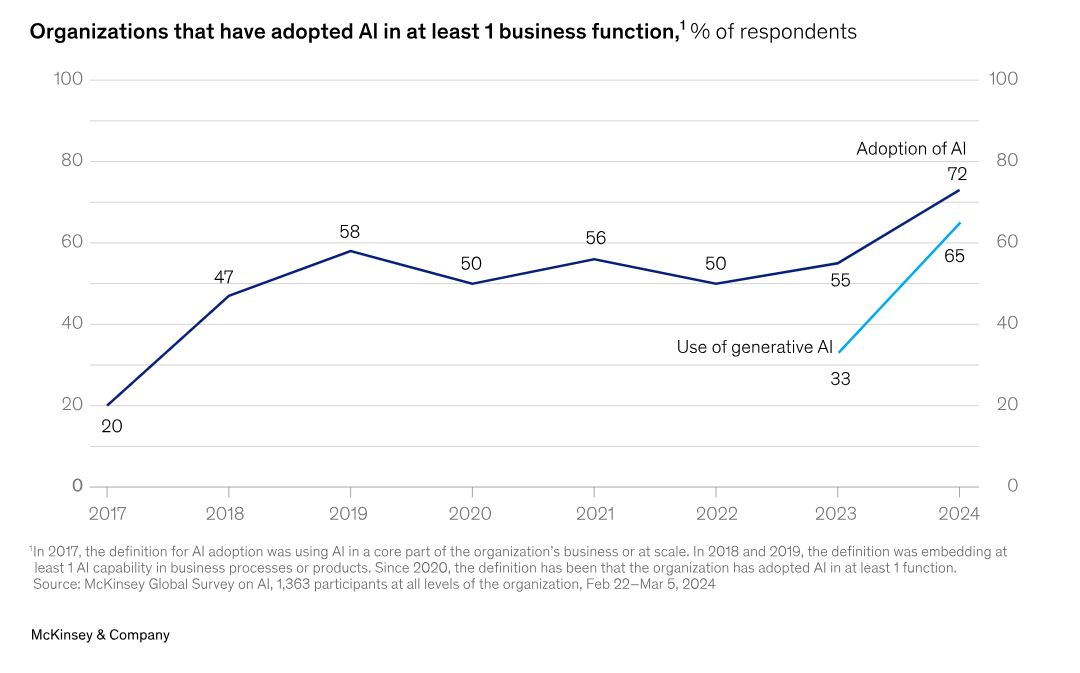
AI-powered tools in the legal profession are transforming foundational practice areas by providing tangible and quantifiable ways to optimize day-to-day processes. Many firms and in-house legal teams want to try it out, and the McKinsey 2024 Global Survey confirms that professional services—including legal services—remain the vertical where AI is most aggressively deployed, contributing to a global adoption rate that has climbed to 72% (up from roughly 50% in previous years).
AI for streamlining communication, collaboration, and workflows
Legal AI tools automate routine tasks and promote team cooperation. AI-driven legal tools can handle everything from billing to messaging with clients, leaving hours of valuable time for strategy.
Practical outcomes show how AI tools can help legal departments. One personal injury law firm adopted both RingCentral RingEX and RingCX to improve communications across their teams. RingEX gave employees a flexible phone system, while RingCX streamlined their high-volume intake operations.
Managers slashed 65% of time spent analyzing team communication using RingCX’s AI Quality Management feature. Their intake staff improved call-handling speeds by 66%, which was directly related to faster client response times.
AI for legal research
AI tools for legal research scan thousands of documents in a matter of minutes, surfacing precedents you would otherwise have to dig manually for days to find.
Unlike basic keyword searches, modern AI legal research tools understand context, legal terminology, and connections between cases.
AI for drafting legal documents
Generative AI is improving the workflow of writing and analyzing legal documents. These types of platforms can create drafts of contracts, briefs, filings, memos, and agreements in minutes rather than hours while adhering to current legal requirements.
About 65% of organizations reported already using Gen AI in at least one business area in early 2024, compared to a third just a year prior.
The best tools leverage both generative AI and data from your company’s existing documents. This helps keep new articles aligned with your language and style, without altering your unique professional style.
However, the rise of AI tools for legal drafting raises important questions of accountability and oversight. These systems are great at creating rough drafts and finding common errors, but they need human attention to ensure they’re appropriate for specific situations.
Best AI tools for general productivity
AI tools in the legal industry include both niche solutions and general productivity tools. Let’s look at some of the latter, which provide usable value across a range of workflows:
1. RingCentral RingEX
RingEX comes with several AI-based features that can specifically benefit legal teams. These include call notes that can be automatically captured in real time, conversation intelligence, and AI-generated meeting summaries that allow attorneys to record crucial points, activities, and client insights.

Pros & cons
- Streamlines communication: Consolidates voice, video, and text, eliminating the time attorneys need to switch from one platform to the next.
- Increased work productivity: Real-time transcriptions, sentiment analysis, and automated summaries allow legal teams to react more quickly and efficiently.
- Data security: RingCentral offers enterprise-level security that is essential for storing sensitive client data.
Pricing
RingCentral provides pricing packages depending on your needs and scale requirements. Prices for law firms can vary based on the number of users and if you’re looking at having sophisticated AI features like real-time analytics and an AI Assistant. Generally, bundles can be customized for each firm’s specific needs, so it’s affordable for both smaller practices and larger companies.
Any specific ethical considerations?
RingCentral values privacy by design, implementing both internal and third-party AI with configurable controls. Law firms must obtain the consent of the client and supervise them in the use of AI summaries and translations, in accordance with confidentiality and professional ethics.
2. Clio
Clio is a legal practice management system for law firms that facilitates the process of handling cases, documents, billing, and client interactions. Its AI-powered features, such as document automation and custom field capturing for case details, are useful to save time and maintain accuracy for cases.
The Clio and RingCentral integration makes it easy for attorneys to communicate with their clients and promotes more effective client collaboration.
Pros & cons
- Pros: Flexible case management, ease of billing, document automation, RingCentral integration, cloud availability.
- Cons: No major drawbacks noted for legal practice needs.
Pricing
Clio offers four different subscription plans with a free trial option.
Any specific ethical considerations?
It’s important to ensure security and data privacy as sensitive data is processed through Clio.
3. Lawmatics
Lawmatics provides AI-powered legal CRM and intake solutions for law firms. The platform’s LM[AI] system facilitates communication by automating email drafting, building customized marketing workflows, and automating intake for new clients.
The RingCentral and Lawmatics integration supports video and voice calls, enabling companies to centralize client communications in the CRM.
Pros & cons
- Pros: AI-powered email and workflow automation, easy intake of clients, RingCentral integration, smooth communications.
- Cons: No major drawbacks noted for legal practice needs.
Pricing
Lawmatics offers flexible pricing based on your requirements.
Any specific ethical considerations?
Client consent is required when processing communications via AI to ensure transparency and data security.
Best AI legal tools for document review and research
Legal research is rapidly advancing thanks to powerful AI tools, automating repetitive activities such as document analysis, e-discovery, case law analysis, and data mining. Here are three top examples of AI for legal document review:
1. CoCounsel
Thomson Reuters’ CoCounsel is an AI-powered generative assistant tailored for attorneys. Designed to integrate with Westlaw, a leading law research database, CoCounsel empowers attorneys to conduct complex searches, document reviews, and analysis of legal databases.
It provides some unique functions, including redlining documents, deposition summaries, timeline generation, and prioritizing relevant data from large datasets.
Pros & cons
- Pros: User-friendly chat interface, integration with Westlaw, accuracy in legal research, document review, e-discovery, redlining, and database search.
- Cons: Restricted to textual content and certain database integrations; may not be sufficient for extremely sophisticated work or special legal niches.
Pricing
Prices for CoCounsel have to be requested in a demo or via Thomson Reuters.
Any specific ethical considerations?
You must uphold client confidentiality and data privacy standards as the legal document review AI platform handles sensitive legal data. Attorneys should verify the validity of AI outputs and exercise their professional judgment to interpret the outputs.
2. Harvey AI
Harvey AI is already well-known for providing accurate answers to legal queries. Through OpenAI technology, Harvey allows legal teams to study case law, conduct due diligence, create reports, and analyze complex legal language.
Pros & cons
- Pros: Great flexibility across many areas of law, useful for repetitive/regulatory tasks, facilitates faster legal searches.
- Cons: May need human proofreading to make sure the legal nuance is understood; not a replacement for legal expertise.
Pricing
Harvey AI has multiple subscription packages, with higher plans containing more features.
Any specific ethical considerations?
Since Harvey AI relies on vast data sets, lawyers should consider whether there’s bias in AI-based research or confidentiality concerns around client information.
3. Paxton Legal AI
Paxton Legal AI’s main goal is to streamline legal research through AI legal document review, case analysis, and contract review. With its NLP (Natural Language Processing) skills, Paxton AI can summarize a document quickly, find important phrases, and provide case preparation tips.
Pros & cons
- Pros: Quick document summary, AI-powered contract analysis, simple NLP-based interface to find critical terms.
- Cons: Limited customizability; not great for very specialized legal fields without extra expert input.
Pricing
Paxton is subscription-based, with pricing plans at various levels that can fit the needs of both solo practitioners and larger law firms.
Any specific ethical considerations?
Paxton’s AI, like all research tools, requires special care when handling confidential legal documents and client data to preserve privacy and integrity.
Best AI legal tools for writing
AI-powered tools offer significant productivity gains, but AI for writing legal documents should be used with caution. Mistakes in legal documents could carry profound legal consequences, so AI tools for legal writing need to complement rather than substitute for human effort.
1. ChatGPT
OpenAI’s ChatGPT is a versatile AI platform that helps write, summarize, and generate text for a wide range of fields, including law. Its conversational interface makes it easy to ask questions or request content, making it convenient as an example of AI for drafting legal documents for attorneys needing instant insight or drafts.
Pros & cons
- Pros: Simple chat platform, works for any type of drafting, universal across sectors, may be useful for initial legal analysis, memos, or bullet-point case preparation.
- Cons: Risk of “hallucinations” (inventing information), does not interface with databases on law, requires careful checking by attorneys for accuracy and legal compliance
Pricing
ChatGPT has a free version (GPT-3.5) and a premium version (GPT-4) with greater functionality. Custom solutions may be available for larger organizations.
Any specific ethical considerations?
Using ChatGPT as a generative AI tool for legal documents raises ethical questions (mainly around confidentiality and privacy). Attorneys will have to refrain from disclosing client details and authenticate AI-generated documents to ensure that their content is not misleading or biased.
2. Rytr AI
Rytr is an all-purpose AI writer tool that simplifies content generation, helping with things such as document drafting, data summaries, and client messages. Although not designed for lawyers, Rytr offers templates and workflow outputs that can be applied for some legal purposes.
Pros & cons
- Pros: Quick generation of readable drafts, user-friendly templates, support for basic client communication, and initial drafting.
- Cons: Low accuracy on more sophisticated legal work; no specialist legal research capabilities; manual validation required for legal precision and accuracy.
Pricing
Rytr’s pricing system offers a free account, a premium version that unlocks additional features, and optional custom configurations for larger teams.
Any specific ethical considerations?
Output must be verified, especially when used in legal contexts. Like any AI tool, attorneys need to be extra careful with client data to avoid violating confidentiality.
3. EvenUP
EvenUP is an AI-powered platform that creates demand letters for personal injury and insurance claims. Because of its niche focus, it’s arguably the best AI for drafting legal documents for lawyers who often engage in early claim negotiations, providing fast and standardized demand letter generation.
Pros & cons
- Pros: Designed for the purpose of writing demand letters, accommodates legal document layout, saves time on personal injury and insurance claims.
- Cons: Only for demand letters and claim situations; not the best AI for writing legal documents in more sophisticated or uncommon cases.
Pricing
EvenUP pricing is customized based on the usage and the requirements of the law firm.
Any specific ethical considerations?
EvenUP’s specialty in demand letters means that it handles personal data. Lawyers should always ensure that the AI-generated material is factual and relevant to the case, as demand letters often help define the case.
What are the benefits of AI legal document analysis and other AI tools in the legal profession
Modern AI-driven legal tools provide quantifiable value for legal departments that strategically implement them. The key advantages of AI legal document review and using more general AI tools for legal departments include:
- Higher-quality document analysis, as AI tools for legal research can minimize human error and speed up the study of case law and discovery of precedents
- Better response times to customer inquiries—demonstrated by companies increasing call speeds using AI-powered systems
- Better client experience through AI-powered transcription and integration with case management platforms, making sure the important information is documented and ready to use
- Insights gained from data on team performance and client interaction can reveal potential process improvement and training opportunities
- Better cooperation between teams, with AI tools in the legal industry ensuring seamless information exchange and workflow management
- Better use of resources by streamlining routine tasks so lawyers can concentrate on high-stakes case strategy and client counsel.
Ethical considerations when using AI tools in the legal profession
The incorporation of AI legal tools into professional practice raises several ethical issues that need to be managed:
Confidentiality and client data
AI tools, specifically generative models such as ChatGPT, pose a privacy concern as they frequently use input data for continuous training, potentially exposing clients’ personal information.
Typically, in practice, attorneys need to establish strong privacy controls around their use of AI platforms to avoid data disclosure or attorney-client privilege breaches.
Professional competence
The legal application of AI involves questions of professional responsibilities. Understanding AI for law departments is a competency in itself. Legal professionals need to acquire the technical expertise to properly assess, deploy, and administer these solutions.
Client communication
Openness about the use of AI tools in legal practice creates trust. Clients should know when and how AI helps their cases, especially when drafting documents and doing research. This transparency is important to managing expectations and maintaining professionalism.
Professional judgment
AI-based legal instruments can’t replace expert judgment, but rather, should be added to it. There is still a role for humans in framing, recognizing nuance, and strategic decision-making based on wider implications beyond just data analysis.
Potential misuse and hallucinations
One particular issue with AI tools is that they generate “hallucinations,” which are convincing but false data, particularly in case citations. This danger highlights the need to critically examine AI-generated data before relying on it in arguments or briefs.
How to choose the right AI legal tools for your business
Whether you’re looking for the best AI tool for legal documents, general productivity, or something else besides, there are several factors to consider:
1. Define your individual needs
Start by documenting your workflows and how AI legal resources can help make them better. Think about what tasks take the longest to complete—whether that’s due diligence, research, or document review—and where errors occur most often.
2. Investigate and evaluate security & reliability
When you’re choosing AI tools for lawyers, security comes first. This is especially important for in-house legal teams handling sensitive corporate data. Look for:
- SOC 2 compliance
- End-to-end encryption
- Regular security audits
- Data storage location controls
- Access management features
3. Explore ease of implementation and use
The best AI tool for legal research or drafting needs to drive more efficiency immediately and shouldn’t complicate matters further. Evaluate:
- User interface intuitiveness
- Required training time
- Customization options
- Mobile accessibility
- Deployment timeline
4. Validate your research with reviews and testimonials
Look for specific metrics and outcomes in user testimonials. Use independent review sites and legal technology communities to get unbiased insight into actual performance.
5. Make your choice
Choose your AI legal tool based on a balanced analysis of all the above. Never forget that the most expensive or feature-rich one isn’t necessarily the best solution—find the one that works best for your requirements and processes.
AI legal tools could help your firm or practice get ahead
AI tools for legal professionals present great potential to improve service quality and efficiency. Try starting with one key area where AI can make an immediate impact. Be it streamlined communications processes, research efficiency, or better accuracy in document drafting, the right AI tool can change the way your team works.
The future of legal practice will see AI legal tools take their place, not as alternatives to professional judgment, but as efficient enablers of improved legal service delivery.
See how RingCentral RingEX gives legal teams the communication infrastructure to make that future a reality.
AI legal tools FAQs
Can I use AI to write a legal brief?
Yes, AI tools can help draft legal briefs by generating structured arguments, summarizing case law, and suggesting relevant citations. However, they should only be used for initial drafts, not final submissions.
Legal professionals must review and verify all AI-generated content to ensure accuracy, compliance, and alignment with the specific case strategy.
What is the best AI tool for writing legal documents?
The best AI legal tools depend on your specific needs. ChatGPT and Rytr AI are both generative AI tools that can be used for general drafting of legal documents. If you work in personal injury law, EvenUP is purpose-built for drafting demand letters and may be a stronger fit.
Whichever tool you choose, two things remain constant:
- Make rigorous accuracy checks on any AI-generated content before it’s used in a client-facing or court-facing context.
- Evaluate every tool against your firm’s compliance and security requirements, especially when handling sensitive case information.
How can I choose the best AI for legal document review or research?
Start by evaluating three key factors: security and reliability, ease of use, and the feature set on offer. The best AI legal tool that handles sensitive legal data should meet strict data protection standards. It should also be intuitive enough for your team to adopt quickly, and rich enough in features to support the specific tasks, including legal document review, case studies, or contract analysis, that matter most to your workflow.
Will AI replace lawyers or paralegals?
No. AI won’t replace lawyers, paralegals, or dedicated legal assistants, even as the technology evolves and improves. The expertise, judgment, and empathy that legal professionals bring to their work are qualities AI cannot truly replicate.
Instead, AI legal tools are designed to support and empower legal teams, helping them access legal information faster, reduce repetitive tasks, and focus on the work that requires human touch.
Updated Apr 06, 2026