Small Business
Enterprise
Developers
Talk to an expert:(800) 574 5290
Support
Plans & PricingCompany
  1. What is CCaaS?
  2. CCaaS vs. UCaaS: What’s the difference?
  3. Core CCaaS features and how to evaluate providers
  4. How to implement CCaaS software for businesses
  5. Why CCaaS is essential for your enterprise's future
  1. Home
  2. Features
  3. Ccaas

TABLE OF CONTENTS

  1. What is CCaaS?
  2. CCaaS vs. UCaaS: What’s the difference?
  3. Core CCaaS features and how to evaluate providers
  4. How to implement CCaaS software for businesses
  5. Why CCaaS is essential for your enterprise's future

Products

  • RingEX
  • Team Chat
  • AI Meetings
  • Business Phone
  • Fax
  • SMS

Contact Center as a Service (CCaaS)

Learn how cloud and AI-powered CCaaS platforms improve customer experience, agent productivity, and enterprise agility.

  • CCaaS replaces on-premises hardware with a scalable cloud-based model
  • Modern platforms unify voice and digital channels
  • A strategic CCaaS solution supports long-term growth
Contact sales

Create effortless customer experiences with a RingCentral CCaaS solution

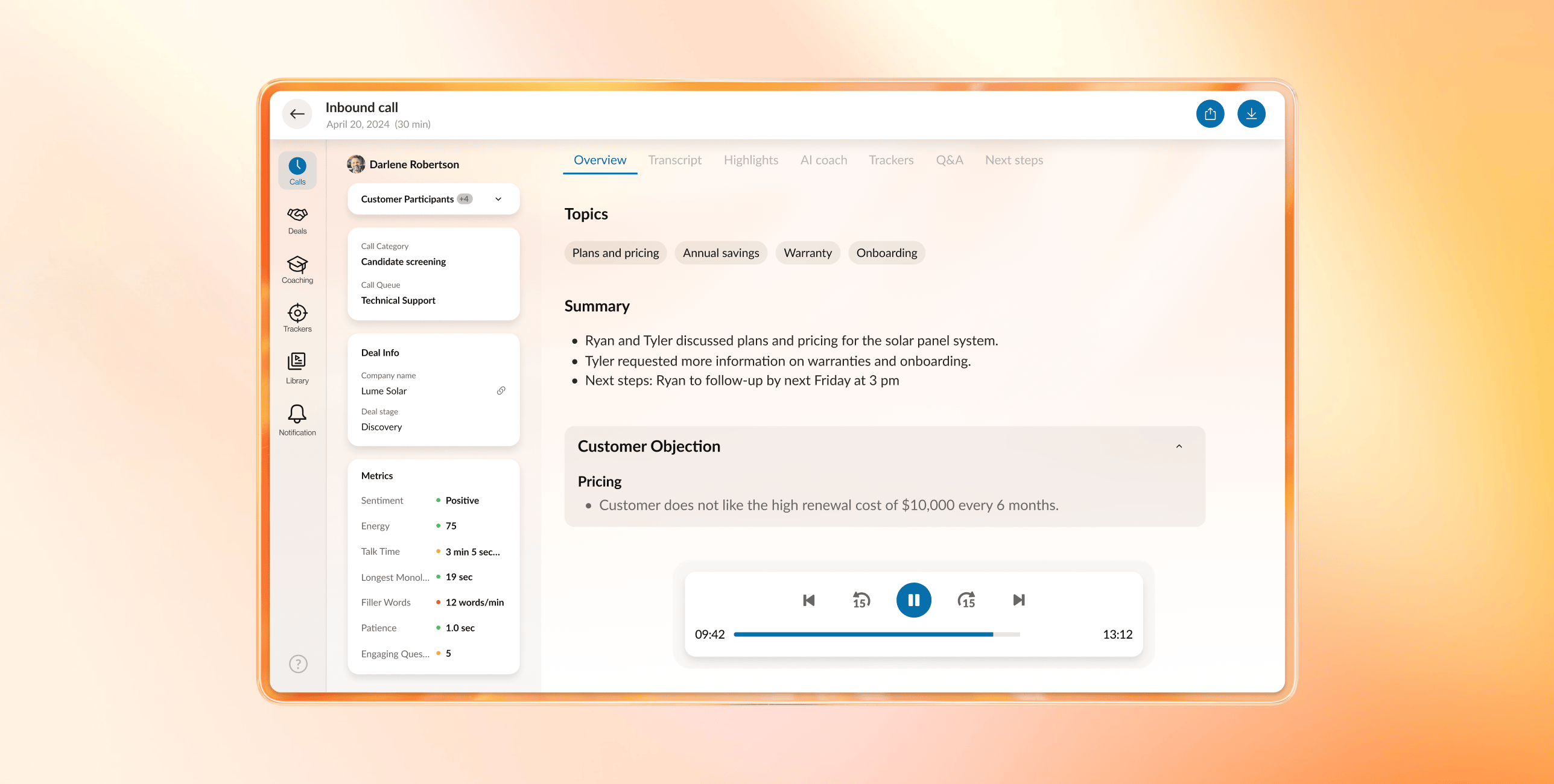
The intelligent scoring feature of RingCX

Customers expect fast, effortless support on their terms. Contact center as a service (CCaaS) makes that possible by replacing rigid, on-premises systems with a cloud-based platform built for scale, flexibility, and intelligence. With CCaaS, enterprises can manage every customer conversation in a single interface, eliminating the infrastructure complexity of traditional models.

Modern CCaaS platforms, like RingCentral RingCX, give agents a unified workspace to support customers across voice and digital channels from any location. The result is faster responses, higher first-contact resolution, and consistent service levels even as volumes spike or teams go remote.

In this guide, you’ll learn what CCaaS is, how AI is reshaping it, and what to consider when choosing the right platform for your organization.

What is CCaaS?

CCaaS, or contact center as a service, is a cloud-based solution that lets you run both inbound and outbound contact center operations without investing in physical servers and telephony hardware. Instead, you access the provider’s software over the internet to deliver customer support and sales at a lower cost and with far more flexibility.

This agility is possible because the provider manages the physical infrastructure, updates, and security. As the subscriber, you simply pay a monthly or annual fee for the platform and the functionality included in your plan.

Over the last few years, CCaaS has evolved from basic cloud call routing to an engagement platform powered by artificial intelligence (AI), making cloud migration a strategic priority for businesses of all sizes.

Find more actionable advice and CCaaS best practices in our contact center guides .

What about call center as a service?

If you assumed that CCaaS stood for call center as a service, you’re not too far off. But in a modern omnichannel environment, it’s important to distinguish between call center and contact center solutions.

While traditional outbound and inbound call centers handled only phone calls, modern contact centers manage customer interactions across all channels. Today, if your support is limited to voice, your service experience is likely falling short of customer expectations.

However, bolting so many channels, like self-service portals, chats, email, text, and others, onto a communications platform made for voice calls is inefficient. It creates silos, inconsistent experiences, and workflows that are prone to breaking.

A cloud contact center solves this by acting as a hub for all customer communications. Human agents can handle phone calls alongside queries from SMS, web chat, email, messaging apps, and other digital channels in a single interface with full interaction history. This omnichannel support makes CCaaS solutions ideal for building a customer-first culture , a top challenge currently facing customer experience (CX) teams.

On-premises contact centers vs. cloud-based CCaaS

The “as a service” part of CCaaS refers to how you deploy, manage, and evolve your technology:

  • With an on-premises contact center , all the hardware and software live in your own data centers. You buy, deploy, and maintain servers, telephony infrastructure, and software licenses. Scaling up requires investing in new hardware and lengthy implementation projects, and upgrades often mean major change programs.
  • With CCaaS, the infrastructure is cloud-based and managed by the provider. Your teams access a unified workspace over the internet using any compatible device, while the provider handles maintenance, upgrades, resilience, and capacity planning. As opposed to on-premises investments, you’re not locked into hardware that might be underused or obsolete in a year or two.

If your company is growing quickly or experiences seasonal call volume spikes, the CCaaS model offers far more agility. You can add or remove users through an admin console or via a quick request to the provider instead of waiting on procurement and IT tickets. The same applies if you need to open a new site or support a new region.

CCaaS vs. UCaaS: What’s the difference?

CCaaS is just one part of your broader communications stack. Many organizations also use UCaaS (unified communications as a service) to handle day-to-day employee collaboration.

UCaaS unifies internal communication channels, including voice calls, videoconferencing, messaging, and more, into a single platform optimized for internal collaboration among your workforce. It includes tools like chat apps, voice over internet protocol (VoIP) calls and meetings, and file sharing.

CCaaS focuses specifically on managing and optimizing customer-facing interactions for service, support, and sales teams. It’s built to handle high volumes of customer interactions with features like interactive voice response (IVR), automatic call distribution (ACD), and quality assurance (QA) support.

There’s some overlap: both improve communication and often share the same underlying infrastructure. However, the use cases and feature sets are different.

Here’s a quick comparison of CCaaS vs. UCaaS :


CCaaS

UCaaS

Platform type

Cloud-based

Cloud-based

Main use

Customer support and engagement

Core CCaaS features and how to evaluate providers

For enterprise contact centers, CCaaS is less about individual features and more about building a resilient, scalable customer engagement platform. The right solution should support lower operating costs, better agent productivity, and more consistent customer experiences across channels.

At a minimum, enterprise-grade CCaaS platforms typically provide:

  • Intelligent routing and self-service: These tools connect customers with the right resources and reduce unnecessary transfers. These features are powered by IVR systems that offer automated solutions or work in tandem with ACD to route calls according to custom rules.
  • Omnichannel engagement: This unifies voice and digital interactions in a single agent experience with shared context and consistent service levels.
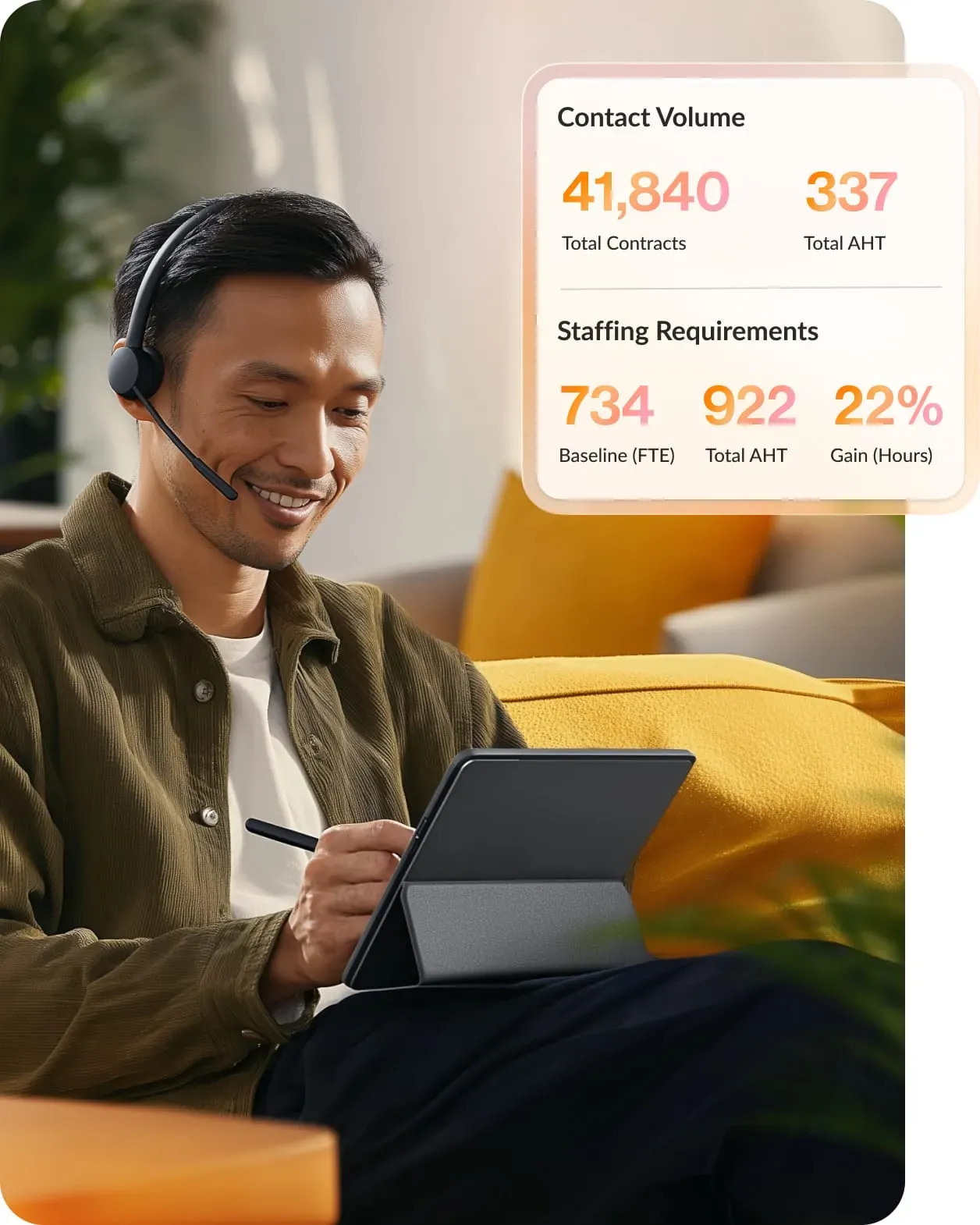
  • Workforce engagement and quality management: These features allow managers to forecast call volume, optimize schedules, and coach agents effectively.
  • Real-time and historical analytics: These tools give leaders visibility into agent performance, trends, and risks across teams and regions
  • AI-powered automation and assistance: This reduces manual work, supports agents in the moment, and surfaces insight from every interaction.

Once you confirm these fundamentals, choosing the right provider comes down to fit and execution.

Enterprise leaders should evaluate CCaaS vendors based on:

  • Total cost of ownership: Analyze how pricing scales as volumes, channels, and automation increase. Clarify what’s included at each pricing tier, how costs scale with usage, and where you may need add-ons to support growth.
  • Ease of deployment and adoption: Prioritize solutions that offer intuitive interfaces for supervisors and frontline agents. Assess how easily teams can configure routing, reports, and workflows.
  • Security, compliance, and reliability: Verify uptime commitments and global resilience, confirming support for encryption, access controls, single sign-on, and audit logging. Ensure the provider holds relevant industry certifications, such as PCI-DSS for financial institutions or HIPAA for healthcare organizations.
  • Integration depth: Make sure the platform works seamlessly with existing customer, collaboration, and analytics systems.
  • Support quality and vendor maturity: Validate the provider's track record through references, service-level agreements, and real-world case studies. Review their global support coverage and escalation processes to ensure long-term stability.

Taken together, this approach helps you move beyond feature checklists and select a CCaaS platform that can support enterprise-scale customer experience and adapt as expectations evolve.

CCaaS that fits into your existing ecosystem

Integration depth matters at the enterprise level. RingCentral connects with 500+ business applications , including customer relationship management platforms, collaboration tools, and productivity suites. With pre-built integrations and open application programming interfaces, you can embed CCaaS into the systems your teams already rely on instead of forcing new workflows.

How to implement CCaaS software for businesses

Most CCaaS solutions are designed for faster deployment than legacy platforms. Still, a structured approach will help you minimize risk and disruption as you transition.

1. Define your goals

Start by clarifying why you’re implementing CCaaS and what success looks like.

Consider:

  • Whether your contact center primarily handles inbound, outbound, or blended interactions
  • Which contact center KPIs you want to improve, such as service level, first contact resolution (FCR), average handle time (AHT), customer satisfaction (CSAT), or net promoter score (NPS)
  • Which pain points you’re addressing, including limited reporting, inflexible routing, or poor remote support

Translate these into requirements for features, integrations, and security. Align on a budget and timeline, and identify executive sponsors and project owners.

2. Do the research

Next, involve your frontline teams. Talk to agents, supervisors, and QA leaders about what’s working today and what’s not. Their input helps you avoid repeating past mistakes in a new platform.

With your requirements list in hand, research CCaaS options through vendor sites, analyst reports, comparison articles, and third-party review platforms. Once you narrow the field, schedule demos and request trials or proof-of-concept environments.

Discover how you can use RingCX to boost agent productivity and delight your customers.

3. Choose a provider

When you’re ready to choose, focus on both current fit and future flexibility.

If you’re migrating from an existing system, work with the provider to map out data migration, coexistence (if needed), and a cutover plan that minimizes downtime.

4. Configure the system

Once you provision your CCaaS environment, you can begin configuring it to match your operating model.

Key steps include:

  • Setting up queues, skills, and routing rules for each channel
  • Configuring IVR menus, greetings, and auto-attendants
  • Integrating your CRM, ticketing, and collaboration tools
  • Designing workflows and automations to reduce manual data entry

RingCentral tip: Use this phase to simplify overly complex processes where possible instead of just replicating legacy setups.

5. Train your team

Even the most intuitive CCaaS platform still requires thoughtful change management.

Provide tailored training for managers, supervisors, and agents so they understand:

  • How to use the new tools in their day-to-day work
  • What’s changing in processes and performance expectations
  • Where to go for help and additional resources

Create a feedback loop so users can share questions or concerns early, and build in refresher sessions as you roll out new features.

6. Monitor progress

After launch, use your platform’s analytics and quality management tools to monitor performance and validate that you’re moving toward your goals.

Track both quantitative metrics, such as AHT, FCR, abandonment rate, and CSAT, and qualitative feedback from customers and agents.

Look for:

  • Unexpected bottlenecks in routing or workflows
  • Training gaps that show up in QA scores or coaching sessions
  • Opportunities to automate additional tasks based on real interaction data

Use this insight to adjust configurations, add capabilities, or evolve your staffing model over time.

Why CCaaS is essential for your enterprise's future

Customer expectations, workforce models, and technology landscapes are all changing faster than traditional contact center platforms can keep up. CCaaS gives you a more adaptive foundation for the next decade of customer engagement .

Equally important, CCaaS aligns your contact center with your broader IT and business strategy. It supports hybrid and remote work, fits into cloud-first initiatives, and integrates with the systems your teams already rely on. Instead of a standalone system, your contact center becomes a connected, data-rich part of your digital ecosystem.

If you’re exploring this shift, RingCentral RingCX gives you a cloud-native CCaaS platform with omnichannel, AI-driven capabilities and flexible deployment options. You can drive immediate value by starting with the channels and teams that benefit most, then expanding your footprint as you see results. This measured approach ensures a smooth transition backed by a partner focused on reliability, security, and long-term support.

Chat with us to learn more about how RingCX can elevate your CX strategy.

See what a modern CCaaS platform looks like in practice

Solutions like RingCentral RingCX help enterprises streamline operations, support distributed teams, and adopt AI at their own pace.

Talk to sales

CCaaS FAQs


RingCX
  • Webinars & Events
  • Features
  • Phones and headsets
  • Partners

    • Global service providers
    • Channel partners
    • ISV partners
    • Hardware partners
    • Connectivity partners
    • Affiliate partners
    • Strategic alliances

    Open Ecosystem

    • Developer platform
    • APIs
    • App gallery
    • LLM Plugins & MCPs

    Learning

    • What's new
    • Resource center
    • Blog
    • Customer stories
    • Newsroom
    • Events & Webinars

    Company

    • About Us
    • Leadership
    • Investor relations
    • Ventures
    • Trust Center
    • Corporate Responsibility
    • Careers

    Help & Support

    • RingCentral app login
    • Admin portal login
    • Customer support
    • Download app
    • View demo
    • Contact sales

    How can we help? Contact us

    LegalPrivacyCookie NoticeSite MapAccessibilityContact Us

    Employee collaboration and meetings

    Primary users

    Customer service, support, and sales teams

    Entire organization

    Type of communications

    Mainly external (customers, partners)

    Mainly internal (but some external)

    Key features

    IVR, ACD, call and digital routing, coaching, analytics, QA

    VoIP calling, video meetings, SMS, team messaging, file sharing

    Primary outcomes

    Improves customer experience and satisfaction

    Improves employee communication and collaboration


    Cookie Preferences
    Do not sell or share my personal data
    © 2026 RingCentral, Inc. All rights reserved.
    A cheerful contact center leader reviewing the Contact Volume and Staffing Requirements forecasts provided by RingCX
    The RingCX dashboard showing an inbound call and AI-powered, real-time coaching around customer objections like pricing
    Country

    By clicking the button, you consent to receiving calls and emails from RingCentral. Calls may be made using automated technology.

    Privacy Policy
    *Required fields