Computer Telephony Integration (CTI)
Your contact center has a phone system and a network of computers or mobile devices. How do you connect them? With CTI. What is Computer Telephony Integration, and how does it improve customer and agent experiences?
What is CTI (Computer Telephony Integration)?
What does CTI stand for? We’ve given that answer away in the heading. But what exactly is Computer Telephony Integration? In simple terms, it’s a type of technology that connects phone systems with computers, enabling a seamless flow of data between the two.
Whether your phone system is a traditional PBX or a cloud-based solution, CTI allows it to “talk” to computers or mobile devices and their applications. That means your team can make and receive calls—and carry out all related tasks—from a single interface.
We should point out here that you don’t purchase CTI as a standalone product. It’s one of the technologies that underpin solutions such as call center software or customer service software.
Types of CTI
There are three main formats for Computer Telephony Integration:
- Traditional hardware-based CTI: This connects computers with desk phones that are part of a landline-based phone system. It can do the basics, such as initiating a call from the desk phone by clicking the phone number in your CRM database. It’s also possible to connect call center headsets with built-in call controls.
- Softphone-based CTI: If a business has swapped traditional desk phones for softphones (essentially using computers or mobile devices as phones), CTI enables users to do things like click to call, access customer details, and manage availability—all within the softphone interface.
- Fully cloud-based CTI: This type of CTI connects cloud-based phone systems to other software functions, features, and tools. For example, it would enable you to integrate your communications software with ticketing software or workforce management solutions.
How does CTI work?
Now that we understand the meaning of CTI, let’s find out how it works.
We’ll start by rewinding to the earliest incarnations of CTI. Those versions enabled click-to-call functionality—so you’d find a phone number on your computer database, click on it, and your landline desk phone would call the number. These days, CTI is more likely to take the form of a phone client embedded within another computer program or app.
CTI can use direct physical connections such as wired landlines or LAN, although most modern versions connect via the internet using VoIP (Voice over Internet Protocol) technology. This means users can access the phone system from anywhere, on any internet-connected device.
Either way, when users receive or place a call, CTI enables the phone and computer systems to exchange relevant data and trigger certain actions. For instance, the phone system sends the caller’s number to the CTI software, which connects with your call management software to direct the call to an appropriate agent. For an inbound call center solution, this functionality streamlines operations by ensuring that agents receive pertinent customer details instantly, leading to faster resolutions and better customer satisfaction.
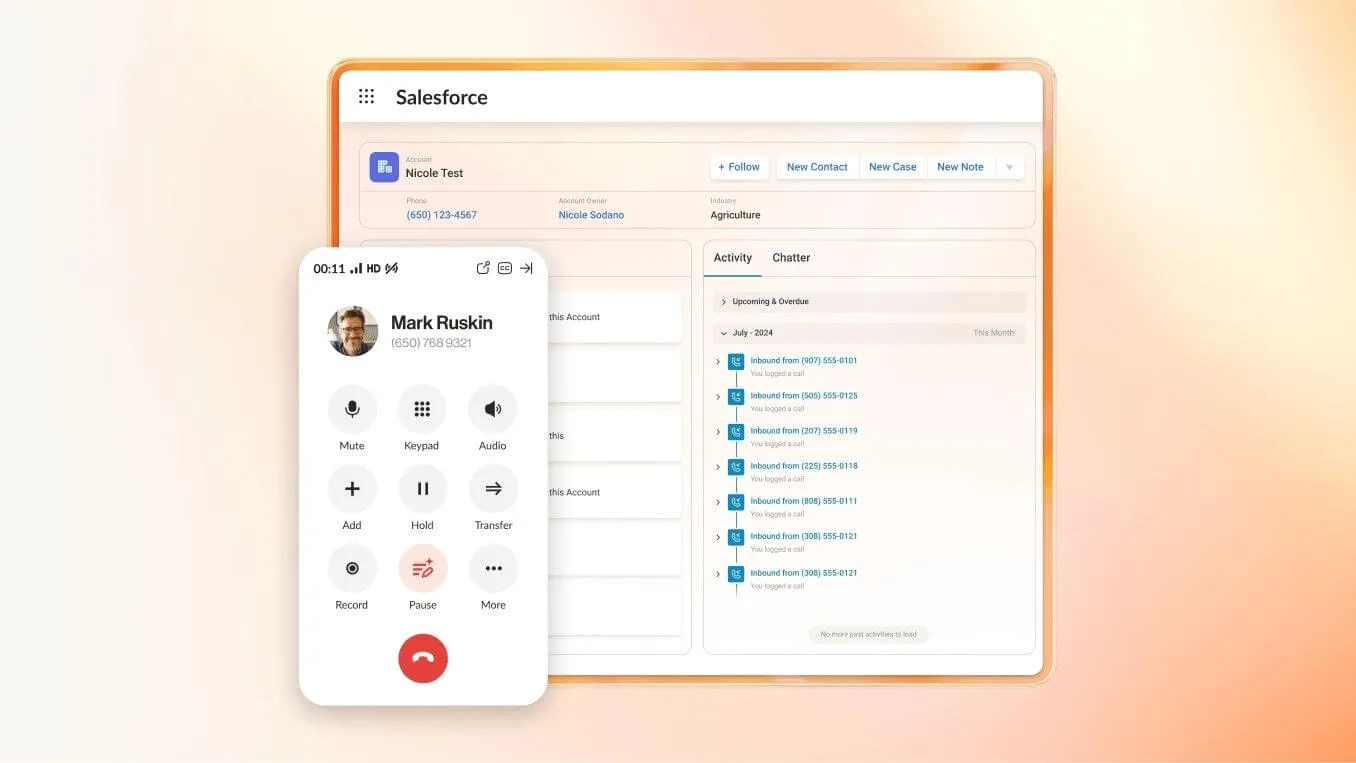
CTI is often used in call centers and contact centers to integrate telephony software with CRMs. It helps agents and sales reps by pulling in customer information and displaying it as a screen pop when a call is routed to them, or before they make an outbound call.
With RingCentral RingCX, CTI enables integrations like a HubSpot dialer, which lets you place and receive calls without leaving the HubSpot app. This and the similar Salesforce integration can track all customer interactions in one central location, and automatically transfer call data into the CRM.
A little later, we’ll discuss how to use CTI in different industries.
Key features CTI enables in the call center
Through Computer Telephony Integration (CTI) technology, your cloud contact center software can enable a host of features that help your workforce improve productivity and efficiency. These advanced capabilities make your agents’ jobs easier while providing excellent customer experiences and improving workforce management.
Common functions Computer Telephony Integration allows for include:
Omnichannel capabilities: Another vital feature of CTI software integration
So, we’ve covered the main telephony functions that CTI facilitates. But contact centers handle many other types of interactions alongside phone calls. It’s essential that your contact center is set up to handle multiple communications channels—and even more important that all those channels are connected seamlessly.
Advantages of Computer Telephony Integration for contact centers
Now let’s take a look at some of the key benefits of Computer Telephony Integration, specifically for contact centers:
Applications and use cases for CTI
Who uses CTI, and why? Here’s a look at how to use Computer Telephony Integration in different businesses and organizations.
How to implement CTI in your contact center
Implementing CTI is pretty simple, as long as you choose the right contact center solution that brings the tech to the table.
All the benefits of Computer Telephony Integration from one intuitive solution
The best way to maximize the benefits of CTI is to choose a contact center solution with a ton of features and functionality. RingCentral RingCX makes it easy to set up an omnichannel contact center, connecting all your communications and leveraging AI for better customer and agent experiences.
In one platform, you have everything you need to manage a super-efficient contact center, from predictive dialers and intelligent routing to live coaching, workforce engagement, and real-time analytics.
Agents and reps are in control of interactions, and could even make and receive calls from within CRMs like HubSpot and Salesforce as well as having instant access to customer info, with the right integrations. The AI Assistant delivers summaries and recommended action items after every interaction.
The icing on the cake is that you can deploy the cloud-based solution in just a few days.